Distributed Training with ezpz⚓︎
This guide takes you from zero to production-quality distributed training on HPC systems. You will write four progressively complex scripts, each building on the last, and learn how to launch, track, and submit jobs across any hardware ezpz supports.
graph LR
    A[Hello Distributed] --> B[DDP Training]
    B --> C[FSDP Training]
    C --> D[HF Trainer]
    D --> E[HF Custom Loop]
Prerequisites
- Python 3.10+ and PyTorch 2.x
- Basic familiarity with neural network training (forward, backward, optimizer step)
- An HPC account (optional for the first two examples — they run on a laptop)
How this guide relates to other docs
- Quickstart — installation cheat sheet and API one-liners
- Recipes — copy-paste snippets for common tasks
- Examples — per-script reference documentation
- This guide — narrative tutorial that ties everything together end-to-end
How ezpz Works⚓︎
ezpz handles three concerns so you don't have to:
- Device detection — probes what accelerator is available (NVIDIA CUDA, Intel XPU, Apple MPS, or CPU) and selects the right communication backend
- Distributed initialization — discovers ranks via MPI, calls
torch.distributed.init_process_group, and assigns each process to its local device - Model wrapping — wraps your model with DDP or FSDP in a single call
The setup_torch() Flow⚓︎
When you call ezpz.setup_torch(), the following happens automatically:
graph TD
    ST["setup_torch()"] --> DD{"TORCH_DEVICE set?"}
    DD -->|yes| USE["Use specified device"]
    DD -->|no| CUDA{"CUDA available?"}
    CUDA -->|yes| GPU["cuda"]
    CUDA -->|no| XPU{"XPU available?"}
    XPU -->|yes| INTEL["xpu"]
    XPU -->|no| MPS{"MPS available?"}
    MPS -->|yes| APPLE["mps"]
    MPS -->|no| CPU["cpu"]
    USE & GPU & INTEL & APPLE & CPU --> BE["Select backend"]
    BE --> NCCL["cuda → nccl"]
    BE --> CCL["xpu → xccl"]
    BE --> GLOO["mps / cpu → gloo"]
    NCCL & CCL & GLOO --> MPI["Discover ranks via MPI"]
    MPI --> IPG["init_process_group"]
    IPG --> DEV["Set local device"]
    DEV --> SEED{"seed= provided?"}
    SEED -->|yes| DO_SEED["Seed RNGs (rank-aware)"]
    SEED -->|no| DIAG
    DO_SEED --> DIAG["Print diagnostics"]
    DIAG --> RET(["Return rank"])
What ezpz Detects on Each System⚓︎
| Property | Value |
|---|---|
| Device | xpu (Intel Data Center Max) |
| Backend | xccl |
| Scheduler | PBS |
| GPUs/node | 12 (6 tiles x 2) |
| Property | Value |
|---|---|
| Device | cuda (NVIDIA A100) |
| Backend | nccl |
| Scheduler | PBS |
| GPUs/node | 4 |
| Property | Value |
|---|---|
| Device | cuda (AMD MI250X) |
| Backend | nccl |
| Scheduler | SLURM |
| GPUs/node | 8 (4 GCDs x 2) |
| Property | Value |
|---|---|
| Device | cuda (NVIDIA A100) |
| Backend | nccl |
| Scheduler | SLURM |
| GPUs/node | 4 |
| Property | Value |
|---|---|
| Device | mps (Apple Silicon) or cuda or cpu |
| Backend | gloo (MPS/CPU) or nccl (CUDA) |
| Scheduler | None |
| GPUs/node | 1-2 (typically) |
Scheduler Detection⚓︎
ezpz figures out which job scheduler is running by checking environment
variables (like PBS_JOBID or SLURM_JOB_ID), then falls back to probing
for commands (qsub, sbatch), and finally to hostname patterns. You never
need to specify the scheduler manually — it just works.
Example 1: Hello Distributed World⚓︎
This first script does nothing more than initialize the distributed environment, print a message from each rank, and shut down. If this works, your setup is correct.
The Script⚓︎
"""Verify that ezpz can initialize distributed training."""
import ezpz

# Initialize distributed — returns this process's global rank
rank = ezpz.setup_torch()

# Query the environment
device = ezpz.get_torch_device()
world_size = ezpz.get_world_size()
local_rank = ezpz.get_local_rank()

print(
    f"Hello from rank {rank}/{world_size} "
    f"(local_rank={local_rank}) on {device}"
)

# Synchronize all ranks before exiting
ezpz.barrier()
if rank == 0:
    print(f"\nAll {world_size} rank(s) synchronized — setup is working!")

ezpz.cleanup()
Running Locally⚓︎
Single process (no distributed):
Two processes on localhost:
Expected output (2 processes):
Hello from rank 0/2 (local_rank=0) on cuda:0
Hello from rank 1/2 (local_rank=1) on cuda:1

All 2 rank(s) synchronized — setup is working!
Running on a Cluster⚓︎
First, get an interactive allocation:
Then launch across all GPUs on the node:
ezpz automatically discovers the node's GPU count and launches one process
per GPU. No -np needed — it reads the allocation.
Check your environment first
If something goes wrong, run ezpz doctor to diagnose common issues
(missing MPI, wrong PyTorch build, scheduler misconfiguration).
Example 2: DDP Training (MNIST)⚓︎
Distributed Data Parallel (DDP) is the simplest form of data parallelism. Every GPU holds a complete copy of the model. The dataset is split across GPUs, each computes gradients on its shard, and gradients are averaged via all-reduce so every copy stays in sync.
graph TB
    D["Dataset: MNIST"] --> S["DistributedSampler"]
    S -->|Shard 0| R0["Rank 0: Full Model"]
    S -->|Shard 1| R1["Rank 1: Full Model"]
    S -->|Shard ...| RN["Rank N: Full Model"]
    R0 --> G0["Forward + Backward"]
    R1 --> G1["Forward + Backward"]
    RN --> GN["Forward + Backward"]
    G0 <-->|All-Reduce| AR(["Synced Gradients"])
    G1 <--> AR
    GN <--> AR
    AR --> U["Optimizer Step"]
The Training Script⚓︎
"""DDP training on MNIST with ezpz."""
import torch
import torch.nn as nn
import torch.nn.functional as F
from torch.utils.data import DataLoader
from torch.utils.data.distributed import DistributedSampler
from torchvision import datasets, transforms

import ezpz

logger = ezpz.get_logger(__name__)

# ── Model ────────────────────────────────────────────────────────────────────


class Net(nn.Module):
    """Simple CNN for MNIST classification."""

    def __init__(self):
        super().__init__()
        self.conv1 = nn.Conv2d(1, 32, 3, 1)
        self.conv2 = nn.Conv2d(32, 64, 3, 1)
        self.fc1 = nn.Linear(9216, 128)
        self.fc2 = nn.Linear(128, 10)

    def forward(self, x):
        x = F.relu(self.conv1(x))
        x = F.max_pool2d(F.relu(self.conv2(x)), 2)
        x = torch.flatten(x, 1)
        x = F.relu(self.fc1(x))
        return self.fc2(x)


# ── Setup ────────────────────────────────────────────────────────────────────

rank = ezpz.setup_torch(seed=42)
device = ezpz.get_torch_device()
world_size = ezpz.get_world_size()

# ── Data ─────────────────────────────────────────────────────────────────────

transform = transforms.Compose([
    transforms.ToTensor(),
    transforms.Normalize((0.1307,), (0.3081,)),
])
dataset = datasets.MNIST("./data", train=True, download=(rank == 0), transform=transform)

# Wait for rank 0 to finish downloading before others try to read
ezpz.barrier()

sampler = DistributedSampler(dataset, num_replicas=world_size, rank=rank)
loader = DataLoader(dataset, batch_size=64, sampler=sampler, num_workers=2)

# ── Model + Optimizer ────────────────────────────────────────────────────────

model = Net().to(device)
model = ezpz.wrap_model(model, use_fsdp=False)  # DDP wrapping
optimizer = torch.optim.Adam(model.parameters(), lr=1e-3)

# ── Metric Tracking ──────────────────────────────────────────────────────────

history = ezpz.History()

# ── Training Loop ────────────────────────────────────────────────────────────

num_epochs = 3
for epoch in range(num_epochs):
    sampler.set_epoch(epoch)  # shuffle differently each epoch
    model.train()
    for batch_idx, (data, target) in enumerate(loader):
        data, target = data.to(device), target.to(device)
        optimizer.zero_grad()
        output = model(data)
        loss = F.cross_entropy(output, target)
        loss.backward()
        optimizer.step()

        # Track metrics with prefixed keys
        pred = output.argmax(dim=1, keepdim=True)
        correct = pred.eq(target.view_as(pred)).sum().item()
        accuracy = correct / len(target)
        train_iter = epoch * len(loader) + batch_idx
        summary = history.update(
            {
                "train/iter": train_iter,
                "train/loss": loss.item(),
                "train/accuracy": accuracy,
            },
            step=train_iter,
        )
        logger.info(summary)

# ── Finalize ─────────────────────────────────────────────────────────────────

if rank == 0:
    history.finalize(outdir="./outputs")

ezpz.cleanup()
Code Walkthrough⚓︎
Setup — ezpz.setup_torch(seed=42) initializes the distributed process
group. When seed= is provided, it seeds Python, NumPy, and PyTorch RNGs
for reproducibility. The seed is automatically varied per rank
(seed * (rank+1) * (local_rank+1)) so each GPU gets a different random
stream. If seed= is omitted, no seeding is performed.
Data loading — DistributedSampler splits the dataset so each rank
processes a unique subset. Call sampler.set_epoch(epoch) at the start of
each epoch to reshuffle.
Model wrapping — ezpz.wrap_model(model, use_fsdp=False) wraps the
model in torch.nn.parallel.DistributedDataParallel. Behind the scenes this
registers gradient hooks that all-reduce after every backward().
Metric tracking — ezpz.History accumulates scalars per step. Using
prefixed keys like "train/loss" groups metrics so each group gets its
own plot with an independent x-axis. The logger.info(summary) call prints
a one-line summary each step. At the end, history.finalize() saves
datasets, generates plots, and logs to any configured backends (see
Tracking Experiments).
Running It⚓︎
Example 3: FSDP Training⚓︎
When to Use FSDP⚓︎
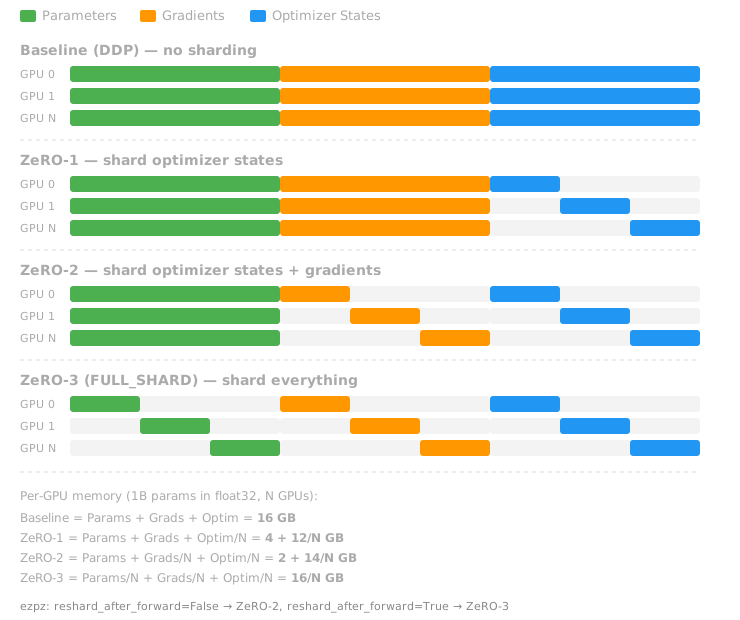
DDP keeps a full copy of the model, gradients, and optimizer state on every GPU. For a 1B-parameter model in float32, that is ~16 GB of state per GPU — just for the model, before any activations.
Fully Sharded Data Parallel (FSDP) shards the model parameters, gradients, and optimizer state across GPUs. Each GPU holds only a fraction, and parameters are gathered on the fly during forward and backward passes.
The One-Line Change⚓︎
Switching from DDP to FSDP is a one-line change:
- model = ezpz.wrap_model(model, use_fsdp=False)  # DDP
+ model = ezpz.wrap_model(model)                   # FSDP (default)
In fact, use_fsdp=True is the default — you were explicitly opting out in
the DDP example.
The FSDP Training Script⚓︎
The script below is the DDP example with FSDP-specific changes highlighted:
"""FSDP training on MNIST with ezpz."""
import torch
import torch.nn as nn
import torch.nn.functional as F
from torch.utils.data import DataLoader
from torch.utils.data.distributed import DistributedSampler
from torchvision import datasets, transforms

import ezpz


class Net(nn.Module):
    """Simple CNN for MNIST classification."""

    def __init__(self):
        super().__init__()
        self.conv1 = nn.Conv2d(1, 32, 3, 1)
        self.conv2 = nn.Conv2d(32, 64, 3, 1)
        self.fc1 = nn.Linear(9216, 128)
        self.fc2 = nn.Linear(128, 10)

    def forward(self, x):
        x = F.relu(self.conv1(x))
        x = F.max_pool2d(F.relu(self.conv2(x)), 2)
        x = torch.flatten(x, 1)
        x = F.relu(self.fc1(x))
        return self.fc2(x)


rank = ezpz.setup_torch(seed=42)
device = ezpz.get_torch_device()
world_size = ezpz.get_world_size()

transform = transforms.Compose([
    transforms.ToTensor(),
    transforms.Normalize((0.1307,), (0.3081,)),
])
dataset = datasets.MNIST("./data", train=True, download=(rank == 0), transform=transform)
ezpz.barrier()

sampler = DistributedSampler(dataset, num_replicas=world_size, rank=rank)
loader = DataLoader(dataset, batch_size=64, sampler=sampler, num_workers=2)

model = Net().to(device)
model = ezpz.wrap_model(            # (1)!
    model,
    dtype="bfloat16",                # (2)!
    reshard_after_forward=True,      # (3)!
)
optimizer = torch.optim.Adam(model.parameters(), lr=1e-3)

history = ezpz.History()

num_epochs = 3
for epoch in range(num_epochs):
    sampler.set_epoch(epoch)
    model.train()
    for data, target in loader:
        data, target = data.to(device), target.to(device)
        optimizer.zero_grad()
        output = model(data)
        loss = F.cross_entropy(output, target)
        loss.backward()
        optimizer.step()

        pred = output.argmax(dim=1, keepdim=True)
        correct = pred.eq(target.view_as(pred)).sum().item()
        history.update({"loss": loss.item(), "accuracy": correct / len(target)})

    if rank == 0:
        avg_loss = sum(history["loss"][-len(loader):]) / len(loader)
        print(f"Epoch {epoch + 1}/{num_epochs} — loss: {avg_loss:.4f}")

ezpz.cleanup()
use_fsdp=Trueis the default — no need to specify it- Mixed precision: parameters are cast to bfloat16 during forward/backward for speed
- Controls sharding strategy (see table below)
FSDP Sharding Strategies⚓︎
The reshard_after_forward argument controls how aggressively parameters are
sharded:
reshard_after_forward |
ZeRO Stage | Behavior | Memory | Speed |
|---|---|---|---|---|
True (default) |
ZeRO-3 / FULL_SHARD | Reshard params after forward AND backward | Lowest | Slightly slower |
False |
ZeRO-2 / SHARD_GRAD_OP | Only reshard after backward | Higher | Faster |
int (e.g. 4) |
HYBRID_SHARD | Shard within groups of N GPUs | Middle | Best for multi-node |
For multi-node training, hybrid sharding (reshard_after_forward=<gpus_per_node>)
is often the sweet spot — it shards within a node (fast NVLink) and
replicates across nodes (slower network).
System-Specific Notes⚓︎
FSDP works with the xccl backend on Intel XPU devices. Use dtype="bfloat16" —
natively supported on Intel Data Center Max GPUs.
With 12 XPUs per node, hybrid sharding with reshard_after_forward=12 is a
good starting point for multi-node jobs.
FSDP works with nccl on NVIDIA A100s. Both bfloat16 and float16 are
supported; bfloat16 is recommended for training stability.
With 4 GPUs per node, hybrid sharding with reshard_after_forward=4 is
useful for multi-node.
FSDP works with nccl on AMD MI250X GCDs. Use dtype="bfloat16".
With 8 GCDs per node, reshard_after_forward=8 for hybrid sharding.
Tracking Experiments⚓︎
ezpz provides a two-layer tracking system:
History— the high-level API you use in training scripts. It accumulates scalars, computes distributed statistics (mean/min/max across ranks), writes JSONL logs, and generates plots.Tracker— the backend multiplexer thatHistoryuses under the hood. It fans out everylog()call to one or more backends simultaneously.
graph TD
    TL["Training Loop"] --> H["history.update"]
    H --> DS["Distributed Aggregation"]
    H --> T["Tracker.log"]
    T --> W["WandbBackend"]
    T --> M["MLflowBackend"]
    T --> C["CSVBackend"]
    H --> J["JSONL File"]
    H -->|finalize| P["Plots + Report"]
Enabling Backends⚓︎
Pass the backends argument to History to select which tracking services
receive your metrics:
# Single backend
history = ezpz.History(backends="wandb")

# Multiple backends — all receive every metric
history = ezpz.History(backends="wandb,mlflow,csv")
You can also set this globally via environment variable:
Weights & Biases⚓︎
Then pass backends="wandb" (or include "wandb" in a comma-separated list).
ezpz automatically disables W&B on non-rank-0 processes to avoid duplicate runs.
MLflow with AmSC (Argonne MLflow Service)⚓︎
The MLflow backend supports the Argonne Machine Learning Science Campaign (AmSC) MLflow instance out of the box.
Quick setup:
-
Create a credentials file at
~/.amsc.env: -
Enable the MLflow backend:
-
That's it. ezpz will:
- Load credentials from
~/.amsc.envautomatically - Authenticate via
X-API-Keyheader - Create an experiment and run
- Print a link to the MLflow UI on stderr
- Load credentials from
Credentials and endpoint URL are provided by the AmSC team. Store them in
~/.amsc.env as shown above. The environment file is loaded automatically
on every run.
Use your facility's MLflow instance or a self-hosted one. Set
MLFLOW_TRACKING_URI and MLFLOW_TRACKING_TOKEN (Bearer auth) in your
environment or ~/.amsc.env.
CSV Backend (Offline)⚓︎
For environments without network access, the CSV backend writes metrics to local files:
Adding Tracking to Your Training Script⚓︎
Here is the FSDP script from the previous section with multi-backend tracking added:
# ... (model, data, optimizer setup as before) ...

history = ezpz.History(
    backends="wandb,mlflow,csv",      # log to all three
    project_name="fsdp-mnist",
    config={"epochs": 3, "batch_size": 64, "lr": 1e-3},
)

for epoch in range(num_epochs):
    sampler.set_epoch(epoch)
    model.train()
    for data, target in loader:
        data, target = data.to(device), target.to(device)
        optimizer.zero_grad()
        output = model(data)
        loss = F.cross_entropy(output, target)
        loss.backward()
        optimizer.step()

        pred = output.argmax(dim=1, keepdim=True)
        correct = pred.eq(target.view_as(pred)).sum().item()
        history.update({"loss": loss.item(), "accuracy": correct / len(target)})

ezpz.cleanup()
The config dict is logged as hyperparameters to all backends (W&B config,
MLflow params, CSV config.json). Each backend handles failures
independently — if MLflow is unreachable, training continues and metrics
still flow to W&B and CSV.
Example 4: Fine-Tuning with HuggingFace Trainer⚓︎
ezpz integrates with the HuggingFace ecosystem in two ways:
| Approach | When to use |
|---|---|
| ezpz launch + HF Trainer | Standard fine-tuning, minimal custom code |
| ezpz setup + custom loop | Custom training logic, non-standard architectures |
Using HF Trainer with ezpz⚓︎
The simplest integration: ezpz handles distributed setup and launching, the HF Trainer handles everything else.
"""Fine-tune a causal LM with HuggingFace Trainer + ezpz."""
import ezpz
from datasets import load_dataset
from transformers import (
    AutoModelForCausalLM,
    AutoTokenizer,
    TrainingArguments,
    Trainer,
    DataCollatorForLanguageModeling,
)

# ── Distributed setup ────────────────────────────────────────────────────────
rank = ezpz.setup_torch(seed=42)
device_type = ezpz.get_torch_device_type()   # "cuda", "xpu", etc.
world_size = ezpz.get_world_size()

# ── Model + Tokenizer ────────────────────────────────────────────────────────
model_name = "gpt2"
tokenizer = AutoTokenizer.from_pretrained(model_name)
tokenizer.pad_token = tokenizer.eos_token
model = AutoModelForCausalLM.from_pretrained(model_name)

# ── Dataset ──────────────────────────────────────────────────────────────────
dataset = load_dataset("wikitext", "wikitext-2-raw-v1", split="train")

def tokenize(examples):
    return tokenizer(
        examples["text"],
        truncation=True,
        max_length=256,
        padding="max_length",
    )

tokenized = dataset.map(tokenize, batched=True, remove_columns=["text"])

# ── Training ─────────────────────────────────────────────────────────────────
training_args = TrainingArguments(
    output_dir="./hf-output",
    num_train_epochs=1,
    per_device_train_batch_size=4,
    gradient_accumulation_steps=4,
    learning_rate=5e-5,
    bf16=True,
    logging_steps=10,
    save_strategy="epoch",
    fsdp="full_shard auto_wrap",              # HF Trainer's built-in FSDP
    fsdp_config={"min_num_params": 1_000},
    report_to="none",                          # we use ezpz tracking instead
)

trainer = Trainer(
    model=model,
    args=training_args,
    train_dataset=tokenized,
    data_collator=DataCollatorForLanguageModeling(tokenizer, mlm=False),
)

trainer.train()

# ── Cleanup ──────────────────────────────────────────────────────────────────
ezpz.cleanup()
if rank == 0:
    print("Fine-tuning complete!")
Running It⚓︎
Example 5: Fine-Tuning with a Custom Loop⚓︎
For full control over the training loop — custom loss functions, gradient
manipulation, non-standard architectures — use ezpz.setup_torch() +
Accelerate with an explicit loop instead of the HF Trainer.
This mirrors the approach in ezpz.examples.hf.
"""Fine-tune a causal LM with an explicit training loop."""
import math
import time
import torch
from torch.utils.data import DataLoader
from datasets import load_dataset
from transformers import (
    AutoConfig,
    AutoModelForCausalLM,
    AutoTokenizer,
    default_data_collator,
    get_scheduler,
)
from accelerate import Accelerator

import ezpz

logger = ezpz.get_logger(__name__)

# ── Setup ────────────────────────────────────────────────────────────────────

rank = ezpz.setup_torch(seed=42)
device = ezpz.get_torch_device()
accelerator = Accelerator(gradient_accumulation_steps=4)

# ── Model + Tokenizer ────────────────────────────────────────────────────────

model_name = "gpt2"
tokenizer = AutoTokenizer.from_pretrained(model_name)
tokenizer.pad_token = tokenizer.eos_token
model = AutoModelForCausalLM.from_pretrained(model_name)

# ── Dataset ──────────────────────────────────────────────────────────────────

dataset = load_dataset("wikitext", "wikitext-2-raw-v1", split="train")
block_size = 256

def tokenize_and_chunk(examples):
    tokens = tokenizer(examples["text"], truncation=True, max_length=block_size)
    tokens["labels"] = tokens["input_ids"].copy()
    return tokens

tokenized = dataset.map(tokenize_and_chunk, batched=True, remove_columns=["text"])
loader = DataLoader(tokenized, batch_size=4, shuffle=True, collate_fn=default_data_collator)

# ── Optimizer + Scheduler ────────────────────────────────────────────────────

optimizer = torch.optim.AdamW(model.parameters(), lr=5e-5)
num_epochs = 1
max_steps = num_epochs * len(loader)
lr_scheduler = get_scheduler("linear", optimizer=optimizer, num_warmup_steps=100, num_training_steps=max_steps)

# Prepare with Accelerate (handles FSDP, device placement, etc.)
model, optimizer, loader, lr_scheduler = accelerator.prepare(model, optimizer, loader, lr_scheduler)

# ── Tracking ─────────────────────────────────────────────────────────────────

history = ezpz.History(project_name="hf-custom-loop")

# ── Training Loop ────────────────────────────────────────────────────────────

step = 0
for epoch in range(num_epochs):
    model.train()
    for batch in loader:
        t0 = time.perf_counter()
        with accelerator.accumulate(model):
            outputs = model(**batch)
            loss = outputs.loss
            accelerator.backward(loss)
            optimizer.step()
            lr_scheduler.step()
            optimizer.zero_grad()

        if accelerator.sync_gradients:
            step += 1
            dt = time.perf_counter() - t0
            loss_val = loss.detach().float().item()
            try:
                ppl = math.exp(loss_val)
            except OverflowError:
                ppl = float("inf")
            summary = history.update(
                {
                    "train/iter": step,
                    "train/loss": loss_val,
                    "train/perplexity": ppl,
                    "train/lr": lr_scheduler.get_last_lr()[0],
                    "train/dt": dt,
                },
                step=step,
            )
            if step % 10 == 0:
                logger.info(summary)

# ── Finalize ─────────────────────────────────────────────────────────────────

if rank == 0:
    history.finalize(outdir="./outputs")

ezpz.cleanup()
Running It⚓︎
The key differences from the Trainer approach:
| HF Trainer | Custom Loop | |
|---|---|---|
| Training logic | Handled by Trainer | You write it |
| Gradient accumulation | Config flag | accelerator.accumulate() |
| Metric tracking | Trainer callbacks | ezpz.History directly |
| Checkpointing | Automatic | accelerator.save_state() |
| Flexibility | Limited | Full control |
For the complete production-quality version with eval loops, checkpointing,
and resume support, see ezpz.examples.hf.
Going to Production with ezpz submit⚓︎
Throughout this guide you have been using ezpz launch inside interactive
allocations. For production runs, you want to submit batch jobs to the
scheduler queue. ezpz submit generates job scripts and submits them.
graph LR
    A["Write Script"] --> B["Test Locally"]
    B --> C["Interactive Job"]
    C --> D["Test at Scale"]
    D --> E["Dry Run Preview"]
    E --> F["Submit Job"]
    F --> G["Monitor Output"]
Submitting a Command⚓︎
The simplest form: pass your training command after --, just like
ezpz launch:
ezpz auto-generates a complete job script, wraps your command with
ezpz launch, and submits it to the scheduler.
Dry Run: Preview Before Submitting⚓︎
Always preview the generated script first:
This prints the generated script without submitting it. Here is what the generated scripts look like:
#!/bin/bash --login
#PBS -l select=2
#PBS -l walltime=01:00:00
#PBS -l filesystems=home
#PBS -A <project>
#PBS -q debug
#PBS -N fsdp_mnist

cd /path/to/your/working/directory

# ── Environment setup ──
source <(curl -fsSL https://ezpz.cool/utils.sh) && ezpz_setup_env

# ── Run ──
ezpz launch -- python3 fsdp_mnist.py
#!/bin/bash --login
#SBATCH --nodes=2
#SBATCH --time=01:00:00
#SBATCH --account=<project>
#SBATCH --partition=debug
#SBATCH --job-name=fsdp_mnist

cd /path/to/your/working/directory

# ── Environment setup ──
source <(curl -fsSL https://ezpz.cool/utils.sh) && ezpz_setup_env

# ── Run ──
ezpz launch -- python3 fsdp_mnist.py
Submitting an Existing Script⚓︎
If you have your own job script, submit it directly:
Resource directives in the script are preserved; CLI flags override them.
Custom Environment Setup⚓︎
By default, ezpz submit uses a curl-based bootstrap to activate your
environment. You can customize this:
# Source a specific setup script
ezpz submit --env /path/to/setup.sh -- python3 train.py

# Or set it globally
export EZPZ_SETUP_ENV=/path/to/setup.sh
Complete Production Workflow⚓︎
Putting it all together — from development to submission:
# 1. Develop and test locally
ezpz launch -np 2 -- python3 fsdp_mnist.py

# 2. Test in an interactive job on one node
qsub -A myproject -q debug -l select=1 -l walltime=00:30:00 -I
ezpz launch -- python3 fsdp_mnist.py

# 3. Preview the multi-node job script
ezpz submit -A myproject -N 4 -q prod -t 02:00:00 \
    --dry-run -- python3 fsdp_mnist.py

# 4. Submit for real
ezpz submit -A myproject -N 4 -q prod -t 02:00:00 \
    -- python3 fsdp_mnist.py
# → Submitted job 12345.polaris-pbs-01.hsn.cm.polaris.alcf.anl.gov
Advanced Topics⚓︎
Tensor Parallelism (FSDP + TP)⚓︎
For very large models, you can combine FSDP (data parallelism across nodes) with tensor parallelism (model parallelism within a node). ezpz calls this 2D parallelism.
graph TB
    subgraph N0["Node 0: Tensor Parallel Group"]
        G0["GPU 0"] <-->|TP| G1["GPU 1"]
        G2["GPU 2"] <-->|TP| G3["GPU 3"]
    end
    subgraph N1["Node 1: Tensor Parallel Group"]
        G4["GPU 4"] <-->|TP| G5["GPU 5"]
        G6["GPU 6"] <-->|TP| G7["GPU 7"]
    end
    N0 <-->|FSDP| N1
Enable it by passing tensor_parallel_size to setup_torch():
rank = ezpz.setup_torch(tensor_parallel_size=4)
model = build_your_model()
model = ezpz.wrap_model(model)  # FSDP wrapping (automatic with TP mesh)
This sets up a 2D device mesh: TP groups within nodes (using fast
interconnects like NVLink) and FSDP across nodes. See
ezpz.examples.fsdp_tp for a complete example.
torch.compile Integration⚓︎
torch.compile works with both DDP and FSDP-wrapped models:
Debugging Tips⚓︎
Force CPU mode for debugging without GPUs:
Log from all ranks (by default, only rank 0 logs at INFO level):
Run diagnostics:
This checks MPI availability, PyTorch build, scheduler detection, and device access.
Common errors and fixes:
| Error | Cause | Fix |
|---|---|---|
RuntimeError: NCCL error |
GPU communication failure | Check that all GPUs are visible (nvidia-smi), try a smaller world size |
No module named 'mpi4py' |
MPI not installed | pip install mpi4py or load the MPI module (module load cray-mpich) |
Connection timed out |
Master address unreachable | Check hostfile, try increasing timeout: TORCH_DDP_TIMEOUT=7200 |
FSDP not supported on mps |
Apple MPS doesn't support FSDP | ezpz falls back to DDP automatically; or use use_fsdp=False explicitly |
Quick Reference⚓︎
API Summary⚓︎
| Function | Purpose |
|---|---|
ezpz.setup_torch(seed=..., tensor_parallel_size=...) |
Initialize distributed, return rank |
ezpz.cleanup() |
Destroy process group |
ezpz.get_torch_device() |
Get the device for this rank (e.g. cuda:0) |
ezpz.get_torch_device_type() |
Get device type string ("cuda", "xpu", "mps", "cpu") |
ezpz.get_rank() |
Global rank |
ezpz.get_local_rank() |
Rank within current node |
ezpz.get_world_size() |
Total number of processes |
ezpz.wrap_model(model, use_fsdp=..., dtype=..., reshard_after_forward=...) |
Wrap with DDP or FSDP |
ezpz.barrier() |
Synchronize all ranks |
ezpz.seed_everything(seed) |
Seed Python, NumPy, PyTorch RNGs |
ezpz.History(backends=..., config=...) |
Metric tracking with multi-backend support |
Key Environment Variables⚓︎
| Variable | Purpose | Default |
|---|---|---|
TORCH_DEVICE |
Force a specific device type | Auto-detected |
TORCH_BACKEND |
Force a specific communication backend | Auto-detected |
EZPZ_TRACKER_BACKENDS / EZPZ_TRACKERS |
Default tracker backends | "wandb" |
MLFLOW_TRACKING_URI |
MLflow server URL | None |
AMSC_API_KEY |
Argonne MLflow API key | None |
WANDB_PROJECT |
W&B project name | None |
TORCH_DDP_TIMEOUT |
init_process_group timeout (seconds) |
3600 |
LOG_FROM_ALL_RANKS |
Enable logging from all ranks | 0 |
Parallelism Strategy Decision Table⚓︎
| Scenario | Strategy | ezpz Call |
|---|---|---|
| Model fits on one GPU | DDP | wrap_model(model, use_fsdp=False) |
| Model is large / memory-constrained | FSDP | wrap_model(model) |
| Multi-node, want to reduce cross-node traffic | Hybrid FSDP | wrap_model(model, reshard_after_forward=<gpus_per_node>) |
| Model too large even for FSDP | FSDP + TP | setup_torch(tensor_parallel_size=N) + wrap_model(model) |
Further Reading⚓︎
- Quickstart — installation and API cheat sheet
- Recipes — copy-paste patterns for common tasks
- Experiment Tracking — History API, backends, and configuration
- Configuration —
TrainConfigandZeroConfigfields - Architecture — module design and internals
- Troubleshooting — common issues and fixes
- CLI Reference — full command-line documentation