Distributing Files to Worker Nodes⚓︎
On large HPC clusters, every Python import that touches the shared
filesystem is a small tax — and at scale, a small tax paid by every
rank turns into minutes of dead time before training even starts.
ezpz yeet copies any directory or tarball to node-local /tmp/
storage on every worker in your job, so subsequent imports, checkpoint
loads, and config reads hit local SSD instead of Lustre. Works for
Python environments, model checkpoints, datasets, configs — anything
that benefits from being node-local before a large run.
Renamed from ezpz yeet-env
ezpz yeet-env still works as a deprecated alias and dispatches
to the same logic. Update your scripts to ezpz yeet when
convenient.
Quick Start⚓︎
# Inside an interactive job allocation:
ezpz yeet                            # no args → syncs the active venv
ezpz yeet .venv.tar.gz               # positional shorthand for --src
ezpz yeet --src /path/to/dataset     # any directory or tarball
Heads up: build your venv against a Python that exists on every node
yeet only copies what's inside the venv directory. If the
venv was created with plain uv venv (no --python flag, or
--python 3.X pointing at a uv-managed interpreter), then
bin/python3 is a symlink into uv's interpreter cache at
~/.local/share/uv/python/cpython-X.Y.Z-..., where the stdlib
also lives. After ezpz yeet ships /tmp/.venv/, every
import asyncio / import threading / import json still
hits the home filesystem through that symlink. At 4k+ ranks
importing the stdlib at startup, this re-creates the import
storm yeet was supposed to eliminate.
Symptom: a wandb/asyncio thread traceback (or any library
that spawns threads) showing paths under
~/.local/share/uv/... even though your venv lives at
/tmp/.venv/.
Workaround: build the venv against a Python that exists at the same path on every worker node. Three options:
Most HPC systems ship a Python via Lmod modules. The
module binary lives under /opt/... or /sw/... and is
part of the system image — guaranteed to be at the same
path on every node.
module load python/3.12.12              # check `module avail python`
uv venv --python $(which python3.12) --relocatable
Make sure the same module load runs on each worker
before training (put it in your job script or sourced
env file).
Use whichever python3.X is in /usr/bin/ on the cluster's
worker image.
Build a self-contained venv that includes the interpreter:
# Download python-build-standalone (same kind uv uses):
curl -L https://github.com/astral-sh/python-build-standalone/releases/download/<DATE>/cpython-3.14.0+...-x86_64-unknown-linux-gnu-install_only.tar.gz \
  | tar -xz

# Use stdlib venv with --copies (uv venv has no --copies flag):
./python/bin/python3.14 -m venv .venv --copies
Trade-off: ~150 MB larger venv; lose uv pip install's
cache (use pip directly, or install uv into the venv).
Conda envs and venvs from python -m venv against a system
Python are unaffected. A proper fix (yeet detects uv-managed
Python and copies the interpreter cache too) is tracked in
TODO §17.
Recommended at scale: build a tarball first
For anything beyond a few nodes, build a tarball once with
ezpz tar-env, then yeet that tarball:
ezpz tar-env                     # one-time: builds .venv.tar.gz next to .venv
ezpz yeet .venv.tar.gz           # broadcast — ~10× faster than per-file rsync
The Lustre side becomes a single sequential read instead of
millions of stat()s, so the local-copy step stays flat as
N grows. See the scaling section
for measured numbers (8 → 4096 nodes on Aurora).
ezpz yeet (no args) will print a hint when it sees a same-named
.tar.gz sitting nearby, so you don't accidentally pay the per-file
cost.
By default (no args), yeet:
- Detects the active Python environment (
sys.prefix) - Discovers all nodes from the job's hostfile (PBS/SLURM)
- Copies the environment to
/tmp/<env-name>/on the current node - Patches activate scripts, shebangs, and symlinks for the new location
- Distributes the patched copy to all remote nodes via greedy rsync fan-out
For non-venv sources (datasets, models, generic directories), step 4 is skipped and the footer prints a generic "Synced to {dst} on N node(s)" message instead of the venv activation guidance.
Complete workflow⚓︎
The full sequence from qsub to a launched training job, including
the venv-creation step that's easy to miss:
# 1. Get an interactive allocation
qsub -A <project> -q debug -l select=2 -l walltime=01:00:00 -I

# 2. Load the system module stack (CUDA / oneAPI / MPI / etc.) WITHOUT
#    the prebuilt frameworks/conda module. See the matching helper for
#    your system in src/ezpz/bin/utils.sh:
#      ezpz_load_modules_aurora      # Aurora
#      ezpz_load_modules_sunspot     # Sunspot
#      ezpz_load_modules_polaris     # Polaris
source <(curl -fsSL https://bit.ly/ezpz-utils)
ezpz_load_modules_polaris            # or _aurora / _sunspot

# 3. Set up a venv against a Python that exists at the same path on
#    every worker node — see the warning callout above for why.
module load python                           # e.g. python/3.12.12 on Aurora
uv venv --relocatable --system-site-packages \
        --no-cache --link-mode=copy \
        --python=$(which python3)
source .venv/bin/activate
uv pip install --no-cache --link-mode=copy "git+https://github.com/saforem2/ezpz"
# ...plus your project's other deps (torch, etc.)

# 4. Build a tarball (one-time, ~3-5 min for ~8 GB) — recommended at scale
ezpz tar-env

# 5. Distribute it to every node's /tmp/
ezpz yeet .venv.tar.gz

# 6. Activate the local copy
deactivate
source /tmp/.venv/bin/activate

# 7. Launch from a shared filesystem path
cd /path/to/your/project
ezpz launch python3 -m your_app.train
For small allocations (< ~16 nodes) you can skip step 4 and just run
ezpz yeet (no args) directly — it'll detect the active venv and
rsync each file. At larger scale, the tar-env + yeet .tar.gz pair
is significantly faster (see scaling
section).
CLI Options⚓︎
ezpz yeet [SRC] [--src PATH] [--dst PATH] [--hostfile PATH]
              [--copy | --compress] [--dry-run]
              [--min-success-nodes N | --min-success-fraction F]
| Arg / Flag | Default | Description |
|---|---|---|
SRC (positional) |
— | Source path. Shorthand for --src. Mutually exclusive with --src |
--src |
Active venv/conda env | Source path. May also be a .tar.gz/.tgz file — see tarball source |
--dst |
/tmp/<basename>/ |
Destination on each node (e.g. /tmp/.venv/ for a venv named .venv) |
--hostfile |
Auto-detect from scheduler | Hostfile for node list |
--copy |
— | Use cp -a for the local copy (faster on Lustre) |
--compress |
— | tar.gz → copy → extract (least Lustre metadata I/O) |
--dry-run |
— | Preview without transferring |
--min-success-nodes N |
— | Hard lower bound: return rc=0 iff at least N nodes succeed. Failures (if any, up to total − N) are written to a sentinel file. See proceed with spares. Mutually exclusive with --min-success-fraction. |
--min-success-fraction F |
— | Same as --min-success-nodes but as a fraction of the hostfile node count (e.g. 0.95 = ≥95%). Resolves to ceil(F × len(hostfile)). |
There's also one environment variable:
| Env Var | Default | Description |
|---|---|---|
EZPZ_YEET_RSYNC_RETRIES |
2 |
Per-target rsync retry budget for transient SSH/rsync failures (e.g. Connection reset by ... port 22). Each failed rsync gets up to N additional attempts before being marked as a final failure. Set to 0 to restore fail-fast-on-first-error. |
Choosing a local copy method
The default rsync is best for incremental updates (after
pip install, etc.) but slow for initial copies on Lustre because
it stats every file individually. For the first transfer, use one
of the faster methods:
| Method | Best for | How it works |
|---|---|---|
--copy |
Fast initial copy | cp -a — sequential dir walk, no checksums |
--compress |
Slowest Lustre / largest envs | tar.gz → copy 1 file → extract locally |
| (default) | Incremental updates | rsync -rlD — only transfers changed files |
# First time: compress for minimal Lustre I/O
ezpz yeet --compress

# Or: cp for simpler fast copy
ezpz yeet --copy

# After pip install: rsync only sends diffs
ezpz yeet
All three methods only affect the local Lustre → /tmp/ copy.
Remote node distribution always uses rsync.
Tarball source⚓︎
If you already have a .tar.gz of your environment (e.g. one you
built earlier with ezpz tar-env, or one shipped
with a project), you can pass it directly:
This is similar to --compress but skips the create step —
the tarball is copied to /tmp/ and extracted there:
cp /lus/.../my-env.tar.gz /tmp/my-env.tar.gztar -xzf /tmp/my-env.tar.gz --strip-components=1 -C /tmp/my-env/- Delete the local tarball copy
- Patch shebangs / activate scripts in
/tmp/my-env/(auto-detects original venv path frombin/activate) - Fan-out
/tmp/my-env/to all worker nodes via rsync
Both .tar.gz and .tgz extensions are recognized. The destination
defaults to /tmp/<basename-without-suffix>/.
Generic (non-venv) sources⚓︎
yeet works on any directory, not just Python environments. Pass a
positional path or use --src to yeet datasets, model checkpoints,
configs — anything that benefits from being node-local:
# Distribute a pre-downloaded HF model checkpoint to /tmp/ on every node
ezpz yeet ~/models/Llama-3.1-8B

# Or a dataset shard
ezpz yeet --src /lus/datasets/imagenet-shard-0
When the source isn't a venv (no bin/activate) and isn't a conda env
(no conda-meta/), the venv path-patching step is skipped and the
trailing guidance is replaced with a generic "Synced to {dst}/ on N
node(s)" footer.
How It Works⚓︎
Overview⚓︎
graph TD
    A["ezpz yeet"] --> B["Detect source env"]
    B --> C["Discover nodes<br/>(PBS_NODEFILE / SLURM_NODELIST)"]
    C --> D["Copy to local /tmp/<br/>(rsync, cp -a, or tar.gz)"]
    D --> E["Patch paths + shebangs"]
    E --> F["Greedy rsync fan-out"]
    F --> G["Print instructions"]
Step 1: Local copy + patch⚓︎
First, yeet copies the source environment to /tmp/<env>/ on
the current node using rsync (default), cp -a (--copy), or
tar.gz (--compress). If the local copy fails, distribution is
aborted immediately — no broken environment gets distributed.
After copying, the venv is patched once in place:
- Replaces hardcoded
VIRTUAL_ENVpaths in activate scripts (bin/activate,bin/activate.csh,bin/activate.fish) - Re-links
python3symlinks to the system Python - Updates
pyvenv.cfg - Rewrites shebangs in all entry-point scripts (
ezpz,pip,torchrun, etc.) — pip bakes absolute paths into these at install time, so they'd still point to the original Lustre location without this step
This patched copy in /tmp/ becomes the source for all subsequent
rsyncs — no per-node patching or SSH needed.
Step 2: Greedy fan-out⚓︎
Instead of syncing from one source to all N nodes (which saturates
the source node's NIC), yeet uses a greedy streaming
fan-out: each node that finishes immediately becomes a source for
others, without waiting for any "wave" to complete.
A single thread pool manages all rsyncs. Each source node is capped
at MAX_PER_SOURCE=8 concurrent outbound rsyncs to avoid
overwhelming any single NIC. As soon as any rsync completes:
- That node is registered as a new source
- New rsyncs are submitted using whichever source has the fewest active transfers (load balancing)
The tree grows organically — no synchronized rounds:
graph TD
    subgraph "Local copy + patch"
        S["Source<br/>(shared filesystem)"] -->|"rsync / cp / tar.gz"| L["/tmp/ on node00"]
    end

    subgraph "Fan-out (greedy, up to 8 per source)"
        L --> A1["node01"]
        L --> A2["node02"]
        L --> A3["node03"]
        L --> A4["node04"]
        L --> A5["node05"]
        L --> A6["node06"]
        L --> A7["node07"]
        L --> A8["node08"]

        A1 -->|"immediately<br/>becomes source"| B1["node09"]
        A1 --> B2["node10"]
        A2 --> B3["node11"]
        A2 --> B4["node12"]
        A3 --> B5["node13"]
    end

    subgraph "...continues until all nodes served"
        B1 --> C1["node17"]
        B2 --> C2["node18"]
        B3 --> C3["..."]
    end

    %% Color by generation: source → gen 1 → gen 2 → gen 3.
    %% Each gen N node becomes a source for gen N+1, so the gradient
    %% reads as the tree growing outward in time. Translucent fills
    %% (Catppuccin palette) so the colors register against either
    %% light or dark page backgrounds.
    classDef src  fill:#fab38730,stroke:#fab387,color:#fab387
    classDef gen1 fill:#89b4fa30,stroke:#89b4fa,color:#89b4fa
    classDef gen2 fill:#a6e3a130,stroke:#a6e3a1,color:#a6e3a1
    classDef gen3 fill:#cba6f730,stroke:#cba6f7,color:#cba6f7

    class S,L src
    class A1,A2,A3,A4,A5,A6,A7,A8 gen1
    class B1,B2,B3,B4,B5 gen2
    class C1,C2,C3 gen3
The key difference from a wave-based approach: if node01 finishes in 15 seconds but node08 takes 30 seconds, node01 immediately starts serving new targets — it doesn't wait for node08.
Scaling behavior
The greedy fan-out gives approximately O(log N) wall-clock time:
- After the local copy, the first 8 rsyncs start from node00
- As each completes (~15–20s), it starts serving others
- With 8 initial targets completing, there are 9 sources
- Those 9 sources can each serve 8 more = 72 concurrent rsyncs
- After ~2 "generations", 500+ nodes are reachable
For a 512-node job with a 5 GB venv:
| Phase | Approx time | Sources |
|---|---|---|
Local copy (Lustre → /tmp/) |
~60s | 1 |
| First 8 targets complete | ~20s | 9 |
| Next ~72 targets complete | ~20s | 81 |
| Remaining ~431 targets | ~20s | 500+ |
| Total | ~2 min | — |
Single-source approach for comparison: 512 × 5 GB from one NIC at 200 Gbps = ~100s theoretical minimum, worse in practice due to TCP congestion with 512 concurrent connections.
ASCII diagram: greedy fan-out
                   ezpz yeet

Step 0: Local copy + patch
══════════════════════════

Lustre ──rsync/cp/tar──▶ /tmp/.venv (node00)
                            │
                        [patch paths + shebangs]
                            │
Step 1: Fan-out (greedy, max 8 per source)
═══════════════════════════════════════════
                            │
      ┌───┬───┬───┬───┬───┬┴──┬───┬───┐
      ▼   ▼   ▼   ▼   ▼   ▼   ▼   ▼
     n01 n02 n03 n04 n05 n06 n07 n08
      │   │
      │   └─── (n02 finishes, starts serving) ──▶ n09, n10, ...
      │
      └─── (n01 finishes, starts serving) ──▶ n11, n12, ...

No waiting for "waves" — each node starts serving
the moment its rsync completes.

Key:
  • Each source limited to 8 concurrent outbound rsyncs
  • New sources pick up work immediately (no wave barriers)
  • Load-balanced: new targets assigned to least-busy source
  • All rsyncs from /tmp/ (fast node-local storage)
  • Path patching happens ONCE (step 0), not per-node
Detail: how source selection works
The thread pool picks the source with the fewest active outbound rsyncs. This naturally load-balances across the tree:
Sources:          Active rsyncs:
node00            ████████ (8/8 — at cap, skip)
node01            ████·· (4/8 — available)      ← picked
node02            ██████ (6/8 — available)
node03            ████████ (8/8 — at cap, skip)
When node01 is selected, one of its remaining slots is used. If all sources are at capacity, the pool waits for any rsync to complete before submitting more work.
Node discovery⚓︎
yeet discovers nodes directly from scheduler environment
variables, without importing heavy Python packages (torch, numpy,
etc.) — so the CLI starts in seconds even on slow filesystems.
The discovery order is:
--hostfileflag if explicitly passedPBS_NODEFILE/HOSTFILEenvironment variables- PBS aux lookup via
PBS_JOBID— checks/var/spool/pbs/aux/<jobid> - PBS
qstatfallback — when env vars aren't set (e.g. afterssh-ing to a compute node), runsqstat -fn1wru $USERto find the running job whose nodelist contains this hostname, then looks up its aux file by jobid - SLURM — expands
SLURM_NODELISTviascontrol show hostnames - Localhost fallback — single-node mode with a warning
After loading the hostfile, hostnames are deduplicated (PBS nodefiles repeat once per-GPU) and FQDN suffixes are stripped.
HSN (high-speed network) auto-detection⚓︎
On Aurora, the PBS hostfile contains bare hostnames (x4717c0s2b0n0),
but the Slingshot HSN interface is reachable via the -hsn0 suffix
at much higher bandwidth than the management network. yeet
probes whether <hostname>-hsn0 resolves and prefers it for all
remote rsyncs if so. On Sunspot the hostfile already contains -hsn0
suffixes, so this is a no-op.
Path patching⚓︎
Venv activate scripts, Python symlinks, and entry-point script
shebangs contain hardcoded absolute paths. yeet patches
these once on the local /tmp/ copy before any distribution:
- Replaces the old
VIRTUAL_ENVpath in activate scripts - Re-links
python3symlinks to the system Python - Updates any old paths in
pyvenv.cfg(thehome = ...line typically points at the system Python's bin dir and is left alone;promptand other path-bearing keys get rewritten) - Rewrites shebangs in all
bin/scripts (e.g.#!/old/path/.venv/bin/python3→#!/tmp/.venv/bin/python3)
Since patching happens before fan-out, all distributed copies arrive already patched — no per-node SSH needed.
Re-running yeet⚓︎
yeet is optimized for first-time distribution, not for true
incremental sync:
- The local Lustre →
/tmp/copy uses--whole-file, which explicitly disables rsync's delta-transfer algorithm — full files are re-copied every time. - The remote fan-out uses
-rlD(recursive, symlinks, devices) but drops-t(modification-time preservation), so rsync's quick check (same size + same mtime → skip) can't reliably detect "unchanged" between runs. Files may re-transfer even when the contents haven't changed.
In practice this is fine: re-running yeet after pip install is
still much faster than restarting from scratch (the local extract
on the source node is cached in page cache; the remote fan-out
overlaps), but don't expect it to be free. For workflows where
you're iterating on a venv between runs, the --copy (cp -a)
mode skips rsync entirely on the local step and is often a win.
Error handling⚓︎
- Failed local copy: distribution is aborted immediately — no broken environment gets sent to remote nodes
- rsync exit 24 (vanished files): treated as success. This
happens when concurrent rsyncs read from the same
/tmp/source while temporary files (e.g. triton plugin builds) come and go. - Transient rsync failures (e.g.
Connection reset by ... port
  22
): per-target retry up to$EZPZ_YEET_RSYNC_RETRIES(default 2) times. Set to 0 to restore fail-fast. - TTY-aware progress: spinner and
\rcarriage returns are suppressed when stdout is not a terminal (e.g. redirected to a file), preventing garbled output in logs.
Proceed with spares (--min-success-nodes / --min-success-fraction)⚓︎
At scale (256N+ allocations), it's common for 1-2 nodes to fail
permanently with SSH issues that retries can't recover. Without an
opt-in, a single bad node fails the whole yeet even when the
caller has spare allocation. Two flags relax this:
# Require at least 512 nodes to succeed (out of however many the
# hostfile contains). Returns rc=0 as long as ≥ 512 ok.
ezpz yeet --min-success-nodes 512

# Same idea but as a fraction of the total node count:
ezpz yeet --min-success-fraction 0.95   # ≥ 95% must succeed
The two flags are mutually exclusive. With a fraction, the
absolute count is ceil(fraction × len(hostfile)) — the
hostfile node count, not the number of rsync operations
(which can be 1 lower when the local-copy step is skipped
because src is already under /tmp).
Hard lower bound. Either flag enforces a hard floor on the
success count: even a clean run (zero failures) returns rc=1 if
fewer than threshold nodes were actually synced. Otherwise
--min-success-nodes 512 on a 500-node hostfile would silently
succeed and downstream training would under-provision.
When the threshold is met and there were failures, yeet:
- Returns rc=0
- Writes the list of failed hostnames to
$dst/.ezpz-yeet-failed-nodes.txt(one host per line) so downstream tooling (training scripts,ezpz launchwrappers) can read and exclude those hosts. Example consumer:
FAILED=$(cat "$DST"/.ezpz-yeet-failed-nodes.txt 2>/dev/null || true)
if [[ -n "$FAILED" ]]; then
  # Build a hostfile that excludes the yeet failures:
  grep -vFf <(echo "$FAILED") "$PBS_NODEFILE" > /tmp/hostfile-good
  ezpz launch --hostfile /tmp/hostfile-good -- python3 -m my.train
else
  ezpz launch -- python3 -m my.train
fi
Stale-sentinel safety. Yeet always removes any pre-existing
$dst/.ezpz-yeet-failed-nodes.txt at the start of finalization,
then re-writes it only when proceeding-with-spares. So the file's
presence is a definitive "yeet just succeeded but here are the
hosts that didn't make it on this run" — never a stale list from
a previous invocation that's since been cleaned up. This matters
when re-running into the same dst (common when src is already
under /tmp and the local-copy step is skipped on the second run).
When the threshold is NOT met, behavior is unchanged — yeet returns rc=1 and no sentinel file is written.
Without either flag the original fail-on-any behavior is preserved.
Worked example at scale
See At scale: surviving 1-2 bad nodes per allocation for a complete end-to-end snippet (522 nodes → train on 520 when 2 fail), plus a behavior table covering each success/failure scenario.
Examples⚓︎
Default: sync the active env⚓︎
Sync a specific environment⚓︎
Custom destination⚓︎
Preview without syncing⚓︎
Real-world example: 64 nodes on Sunspot⚓︎
8.3 GB venv → 65 nodes in ~2 minutes
$ ezpz yeet
  Source: /lus/tegu/.../torchtitan-213/.venv (8.3G)
  Target: /tmp/.venv/ on 65 node(s)
    local:  x1921c0s2b0n0 (rsync to /tmp/.venv/)
    remote: x1921c0s2b0n0-hsn0, x1921c0s3b0n0-hsn0, x1921c0s4b0n0-hsn0, ... (64 nodes)
  Syncing (65 nodes)...

    ✓ x1921c0s2b0n0 (local, rsync) — 49.6s
    ✓ x1921c0s2b0n0-hsn0 — 0.8s
    ✓ x1921c0s6b0n0-hsn0 — 19.6s
    ✓ x1921c1s5b0n0-hsn0 — 20.1s
    ✓ x1921c1s7b0n0-hsn0 — 20.2s
    ...
    ✓ x1921c7s6b0n0-hsn0 — 21.2s
  Done in 91.2s
Timing breakdown:
| Phase | Time | Notes |
|---|---|---|
Local copy (Lustre → /tmp/) |
50s | One-time, includes path patching |
| Fan-out to 64 remote nodes | ~42s | Greedy, nodes become sources as they finish |
| Total | ~91s | 8.3 GB to 65 nodes |
The first 8 nodes complete in ~20s, then immediately start serving as sources for the remaining nodes. No node waits for others to finish — the tree grows as fast as individual rsyncs complete.
Scaling: Aurora, 8 → 4096 nodes⚓︎
Use the tarball broadcast for scale
The numbers below are all from the tarball broadcast mode —
ezpz tar-env to build the archive, then ezpz yeet
.venv.tar.gz to distribute it. This is the path that scales:
- The Lustre side becomes one sequential read regardless of
node count, instead of millions of
stat()s. - The pre-tarball per-file rsync mode was projected to take 1–2 hours at 256+ nodes; the tarball mode below stays under 13 minutes even at 4096 nodes.
- The cost of
ezpz tar-env(3-5 min for a typical 8 GB venv) is paid once; every subsequent yeet reuses the tarball.
ezpz yeet (no args) prints a hint when it finds a same-named
tarball nearby, so you don't need to remember to pass it
explicitly after building once.
Full 10-point sweep using the tarball broadcast mode on Aurora,
measured 2026-04-30 to 2026-05-01. The benchmark harness lives in
saforem2/torchtitan@ezpz
along with the raw CSV and the plotting script.
Each job: ezpz yeet --src .venv.tar.gz, then 10 training steps of
agpt_2b to verify the broadcast venv was functional.
first_step_seconds is the wall-clock from job start of the first
training step (a useful proxy for total time-to-train) and includes
import + initialization overhead on top of the yeet itself.
| Nodes | yeet (s) | First-step (s) | Per-node (ms) |
|---|---|---|---|
| 8 | 69.7 | 29.3 | 8,712 |
| 16 | 89.7 | 31.6 | 5,606 |
| 32 | 89.2 | 20.9 | 2,788 |
| 64 | 91.2 | 34.6 | 1,425 |
| 128 | 110.4 | 30.5 | 862 |
| 256 | 132.9 | 37.6 | 519 |
| 512 | 174.5 | 44.5 | 341 |
| 1024 | 255.4 | 60.8 | 249 |
| 2048 | 421.4 | 94.8 | 206 |
| 4096 | 750.6 | 194.0 | 183 |
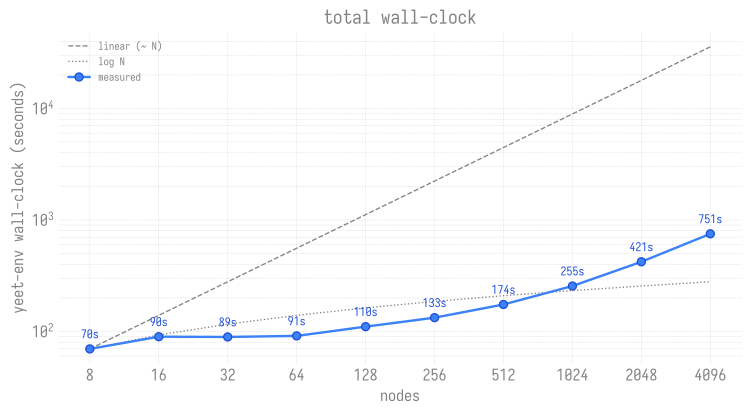
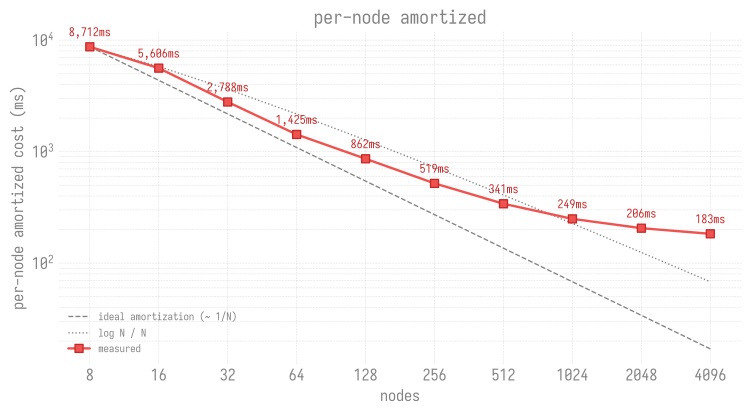
Two regimes show up in the data:
- 8–64 nodes is extract-bound. Total wall-clock is roughly flat at 70–91 s; per-node cost falls 8.7 s → 1.4 s as more nodes share the fixed-cost local extraction.
- ≥128 nodes is broadcast-bound. Total wall-clock grows super-linearly. Each 2× in nodes adds ~1.5–1.8× wall-clock (256→512: 1.31×, 512→1024: 1.46×, 1024→2048: 1.65×, 2048→4096: 1.78×) — the broadcast tree depth and per-leaf bandwidth contention both grow with scale.
Per-node amortized cost drops monotonically from 8.7 s/node at N=8 to 0.18 s/node at N=4096 — a 48× efficiency gain over the sweep. Even at the full-Aurora 4096-node scale, the pre-launch overhead is under 13 minutes.
First-step latency (time from job start to step 1 logged) stays
under 1 minute through 1024 nodes and only really starts to climb at
2048+ — consistent with init_process_group overhead growing with
world size. At 4096 nodes the first step lands in 3 min 14 s, so
total time-to-train (yeet + first step) is about 16 minutes.
At scale: surviving 1-2 bad nodes per allocation⚓︎
At 256+ nodes, it's near-certain that 1-2 nodes will fail
permanently with SSH issues that retries can't recover (cable
problems, daemon stuck, etc.). Without the proceed-with-spares
flags from Error handling, a single bad node
fails the whole yeet even though the user usually has spare
allocation to absorb the loss.
Worked example: 522 nodes allocated on Aurora, only 512 actually needed for training:
# 1. Yeet with a threshold matching the actual training need.
#    Transient failures are auto-retried (PR #160's logic) up to
#    EZPZ_YEET_RSYNC_RETRIES times per node; the threshold only
#    fires for nodes that exhaust retries.
ezpz yeet --src .venv.tar.gz --min-success-nodes 512
RC=$?

# 2. yeet returns 0 with the failed-node list co-located with dst.
if [[ $RC -ne 0 ]]; then
    echo "yeet did not meet the threshold; aborting"
    exit 1
fi

DST=/tmp/.venv  # the default --dst
FAILED=$(cat "$DST"/.ezpz-yeet-failed-nodes.txt 2>/dev/null || true)

# 3. Build a launch hostfile that excludes the failed nodes.
#    `grep -vFf` filters PBS_NODEFILE against the failures.
if [[ -n "$FAILED" ]]; then
    echo "yeet succeeded but $FAILED was unreachable; excluding from launch"
    grep -vFf <(echo "$FAILED") "$PBS_NODEFILE" > /tmp/hostfile-good
    HOSTFILE_ARG="--hostfile /tmp/hostfile-good"
else
    HOSTFILE_ARG=""  # no failures → use default PBS_NODEFILE
fi

# 4. Launch training with the (possibly filtered) hostfile.
ezpz launch $HOSTFILE_ARG -- python3 -m my.train
What happens in practice:
| Scenario | ezpz yeet rc |
Sentinel file | Outcome |
|---|---|---|---|
| All 522 nodes succeed | 0 | removed if stale, otherwise absent | Train on 522 nodes |
| 521 succeed, 1 transient fail recovers via retry | 0 | removed if stale (retry path = no failure) | Train on 522 nodes |
| 520 succeed, 2 permanent fails (threshold 512 met) | 0 | written with the 2 hostnames | Train on 520 nodes |
| 500 succeed, 22 permanent fails (threshold 512 missed) | 1 | removed if stale | Abort — user investigates |
| 511 succeed, 0 fails but hostfile only has 511 nodes | 1 | not written | Abort — --min-success-nodes 512 is a hard floor |
The sentinel file is only written when yeet is exiting
successfully despite failures, so its presence is a definitive
"yeet survived but here's who didn't make it" signal — never
stale data from a previous run. Yeet unconditionally removes
any pre-existing sentinel at the start of finalization, so the
absence of the file means "no failures to report" regardless of
what a previous run wrote.
See Also⚓︎
ezpz launch— launch distributed training (respects$VIRTUAL_ENVso it Just Works after yeet + activate)ezpz.utils.yeet_env— Python API reference- Shell Environment —
ezpz_setup_*helper functions (includingezpz_setup_xpufor Intel GPUs)