🍋 ezpz⚓︎
Write once, run anywhere.
ezpz makes distributed PyTorch code portable across any supported hardware
{NVIDIA, AMD, Intel, MPS, CPU} with zero code changes.
This lets us write Python applications that can be run anywhere, at any scale; with native job scheduler (PBS, Slurm)1 integration and graceful fallbacks for running locally2 on Mac, Linux machines.
🗂️ Organization
- 🍋 ezpz: Home of the
ezpzdocumentation - 🏃♂️ Quickstart: Overview and getting started guide
highlighting the core features of
ezpz. - 🧰 CLI:
ezpzcommand-line interface- 🚀
ezpz launch: Launch distributed PyTorch applications - 💯
ezpz test: Test distributed PyTorch setup - 🩺
ezpz doctor: Tool for diagnosing environment issues - 🧪 Experimental: Additional utilities that may be useful (rough
edges)
ezpz generate: Generate text (run inference) with arbitrary HF modelsezpz generate_tui: Generate text (run inference) from inside a TUI!
- 📘 References: Implementation details and notes for reference
- 🚀
- 📝 Examples: Example PyTorch
applications
ezpz.examples.test: Train MLP with DDP on MNISTezpz.examples.fsdp: Train CNN with FSDP on MNISTezpz.examples.vit: Train ViT with {FSDP, DDP} on MNISTezpz.examples.fsdp_tp: Train Transformer with FSDP + TP on HF Datasetsezpz.examples.diffusion: Train Diffusion LLM with FSDP on HF Datasetsezpz.examples.hf_trainer: Train / Fine-Tune LLM (from HF) with FSDP + HF Trainer on HF Datasets- HF Trainer Comparison: Breakdown of performance comparison between Aurora and Polaris at ALCF
- 🐍 Python API: Complete Python API reference
- 📓 Notes: Additional notes for reference
- ❓ FAQ: Frequently Asked Questions
- 🧤 Hands-On Slides: Slides
from a talk I gave on
ezpz - 🚧 INCOMPLETE:
- 🕸️ Parallelism: Notes on different parallelism strategies
- 🏖️ Shell Environment: Notes on shell environment management
- 🤖 Systems: Notes on various HPC systems
- 📦 Yeet Environment: Notes on building / distributing Python environments for efficient launching at scale.
- 💯 Tests: Documentation on the test suite
👀 Overview⚓︎
ezpz is, at its core, a Python library that provides a variety of utilities
for both writing and launching distributed PyTorch applications.
These can be broken down (~roughly) into:
-
🐍 Python library:
import ezpz
Python API for writing hardware-agnostic, distributed PyTorch code. -
🧰 CLI:
ezpz <command>
Utilities for launching distributed PyTorch applications:- 🚀
ezpz launch: Launch commands with automatic job scheduler detection (PBS, Slurm) - 💯
ezpz test: Run simple distributed smoke test - 🩺
ezpz doctor: Health check your environment
- 🚀
-
📝 Examples: Scalable and ready-to-go!
Running Examples
Any of the examples below can be launched with (sensible defaults if not specified):
🤗 HF Integration
-
ezpz.examples.{fsdp_tp,diffusion, hf_trainer,hf_trainer} all support arbitrary 🤗 Hugging Face datasets e.g.:dataset="stanfordnlp/imdb" # or any other HF dataset ezpz launch python3 -m ezpz.examples.fsdp_tp --dataset "${dataset}" ezpz launch python3 -m ezpz.examples.diffusion --dataset "${dataset}" ezpz launch python3 -m ezpz.examples.hf_trainer \ --model_name_or_path meta-llama/Llama-3.2-1B \ --dataset_name="${dataset}" \ --streaming \ --bf16=true -
ezpz.examples.hf_trainersupports arbitrary combinations of (compatible)transformers.from_pretrainedmodels, and HF Datasets (with support for streaming!)
Simple Example
Output
Macbook Pro
#[01/08/26 @ 14:56:50][~/v/s/ezpz][dev][$✘!?] [4s]
; ezpz launch python3 -c 'import ezpz; print(ezpz.setup_torch())'
[2026-01-08 14:56:54,307030][I][ezpz/launch:515:run] No active scheduler detected; falling back to local mpirun: mpirun -np 2 python3 -c 'import ezpz; print(ezpz.setup_torch())'
Using [2 / 2] available "mps" devices !!
0
1
[2025-12-23-162222] Execution time: 4s sec
Aurora (2 Nodes)
#[aurora_frameworks-2025.2.0](torchtitan-aurora_frameworks-2025.2.0)[1m9s] #[01/08/26,14:56:42][x4418c6s1b0n0][/f/d/f/p/p/torchtitan][main][?] ; ezpz launch python3 -c 'import ezpz; print(ezpz.setup_torch())' [2026-01-08 14:58:01,994729][I][numexpr/utils:148:_init_num_threads] Note: detected 208 virtual cores but NumExpr set to maximum of 64, check "NUMEXPR_MAX_THREADS" environment variable. [2026-01-08 14:58:01,997067][I][numexpr/utils:151:_init_num_threads] Note: NumExpr detected 208 cores but "NUMEXPR_MAX_THREADS" not set, so enforcing safe limit of 16. [2026-01-08 14:58:01,997545][I][numexpr/utils:164:_init_num_threads] NumExpr defaulting to 16 threads. [2026-01-08 14:58:02,465850][I][ezpz/launch:396:launch] ----[🍋 ezpz.launch][started][2026-01-08-145802]---- [2026-01-08 14:58:04,765720][I][ezpz/launch:416:launch] Job ID: 8247203 [2026-01-08 14:58:04,766527][I][ezpz/launch:417:launch] nodelist: ['x4418c6s1b0n0', 'x4717c0s6b0n0'] [2026-01-08 14:58:04,766930][I][ezpz/launch:418:launch] hostfile: /var/spool/pbs/aux/8247203.aurora-pbs-0001.hostmgmt.cm.aurora.alcf.anl.gov [2026-01-08 14:58:04,767616][I][ezpz/pbs:264:get_pbs_launch_cmd] ✅ Using [24/24] GPUs [2 hosts] x [12 GPU/host] [2026-01-08 14:58:04,768399][I][ezpz/launch:367:build_executable] Building command to execute by piecing together: [2026-01-08 14:58:04,768802][I][ezpz/launch:368:build_executable] (1.) launch_cmd: mpiexec --envall --np=24 --ppn=12 --hostfile=/var/spool/pbs/aux/8247203.aurora-pbs-0001.hostmgmt.cm.aurora.alcf.anl.gov --no-vni --cpu-bind=verbose,list:2-4:10-12:18-20:26-28:34-36:42-44:54-56:62-64:70-72:78-80:86-88:94-96 [2026-01-08 14:58:04,769517][I][ezpz/launch:369:build_executable] (2.) cmd_to_launch: python3 -c 'import ezpz; print(ezpz.setup_torch())' [2026-01-08 14:58:04,770278][I][ezpz/launch:433:launch] Took: 3.01 seconds to build command. [2026-01-08 14:58:04,770660][I][ezpz/launch:436:launch] Executing: mpiexec --envall --np=24 --ppn=12 --hostfile=/var/spool/pbs/aux/8247203.aurora-pbs-0001.hostmgmt.cm.aurora.alcf.anl.gov --no-vni --cpu-bind=verbose,list:2-4:10-12:18-20:26-28:34-36:42-44:54-56:62-64:70-72:78-80:86-88:94-96 python3 -c import ezpz; print(ezpz.setup_torch()) [2026-01-08 14:58:04,772125][I][ezpz/launch:220:get_aurora_filters] Filtering for Aurora-specific messages. To view list of filters, run with EZPZ_LOG_LEVEL=DEBUG [2026-01-08 14:58:04,772651][I][ezpz/launch:443:launch] Execution started @ 2026-01-08-145804... [2026-01-08 14:58:04,773070][I][ezpz/launch:138:run_command] Caught 24 filters [2026-01-08 14:58:04,773429][I][ezpz/launch:139:run_command] Running command: mpiexec --envall --np=24 --ppn=12 --hostfile=/var/spool/pbs/aux/8247203.aurora-pbs-0001.hostmgmt.cm.aurora.alcf.anl.gov --no-vni --cpu-bind=verbose,list:2-4:10-12:18-20:26-28:34-36:42-44:54-56:62-64:70-72:78-80:86-88:94-96 python3 -c 'import ezpz; print(ezpz.setup_torch())' cpubind:list x4717c0s6b0n0 pid 118589 rank 12 0: mask 0x1c cpubind:list x4717c0s6b0n0 pid 118590 rank 13 1: mask 0x1c00 cpubind:list x4717c0s6b0n0 pid 118591 rank 14 2: mask 0x1c0000 cpubind:list x4717c0s6b0n0 pid 118592 rank 15 3: mask 0x1c000000 cpubind:list x4717c0s6b0n0 pid 118593 rank 16 4: mask 0x1c00000000 cpubind:list x4717c0s6b0n0 pid 118594 rank 17 5: mask 0x1c0000000000 cpubind:list x4717c0s6b0n0 pid 118595 rank 18 6: mask 0x1c0000000000000 cpubind:list x4717c0s6b0n0 pid 118596 rank 19 7: mask 0x1c000000000000000 cpubind:list x4717c0s6b0n0 pid 118597 rank 20 8: mask 0x1c00000000000000000 cpubind:list x4717c0s6b0n0 pid 118598 rank 21 9: mask 0x1c0000000000000000000 cpubind:list x4717c0s6b0n0 pid 118599 rank 22 10: mask 0x1c000000000000000000000 cpubind:list x4717c0s6b0n0 pid 118600 rank 23 11: mask 0x1c00000000000000000000000 cpubind:list x4418c6s1b0n0 pid 66450 rank 0 0: mask 0x1c cpubind:list x4418c6s1b0n0 pid 66451 rank 1 1: mask 0x1c00 cpubind:list x4418c6s1b0n0 pid 66452 rank 2 2: mask 0x1c0000 cpubind:list x4418c6s1b0n0 pid 66453 rank 3 3: mask 0x1c000000 cpubind:list x4418c6s1b0n0 pid 66454 rank 4 4: mask 0x1c00000000 cpubind:list x4418c6s1b0n0 pid 66455 rank 5 5: mask 0x1c0000000000 cpubind:list x4418c6s1b0n0 pid 66456 rank 6 6: mask 0x1c0000000000000 cpubind:list x4418c6s1b0n0 pid 66457 rank 7 7: mask 0x1c000000000000000 cpubind:list x4418c6s1b0n0 pid 66458 rank 8 8: mask 0x1c00000000000000000 cpubind:list x4418c6s1b0n0 pid 66459 rank 9 9: mask 0x1c0000000000000000000 cpubind:list x4418c6s1b0n0 pid 66460 rank 10 10: mask 0x1c000000000000000000000 cpubind:list x4418c6s1b0n0 pid 66461 rank 11 11: mask 0x1c00000000000000000000000 Using [24 / 24] available "xpu" devices !! 8 10 0 4 3 5 7 11 6 1 9 2 14 15 12 13 16 17 19 22 20 23 18 21 [2026-01-08 14:58:14,252433][I][ezpz/launch:447:launch] ----[🍋 ezpz.launch][stop][2026-01-08-145814]---- [2026-01-08 14:58:14,253726][I][ezpz/launch:448:launch] Execution finished with 0. [2026-01-08 14:58:14,254184][I][ezpz/launch:449:launch] Executing finished in 9.48 seconds. [2026-01-08 14:58:14,254555][I][ezpz/launch:450:launch] Took 9.48 seconds to run. Exiting. took: 18sdemo.pydemo.pyimport ezpz # automatic device + backend setup for distributed PyTorch _ = ezpz.setup_torch() # CUDA/NCCL, XPU/XCCL, {MPS, CPU}/GLOO, ... device = ezpz.get_torch_device() # {cuda, xpu, mps, cpu, ...} rank = ezpz.get_rank() world_size = ezpz.get_world_size() # ...etc if rank == 0: print(f"Hello from rank {rank} / {world_size} on {device}!")We can launch this script with:
Output(s)
MacBook Pro
Aurora (2 nodes)
# from 2 nodes of Aurora: #[aurora_frameworks-2025.2.0](foremans-aurora_frameworks-2025.2.0)[C v7.5.0-gcc][43s] #[01/08/26,07:26:10][x4604c5s2b0n0][~] ; ezpz launch python3 demo.py [2026-01-08 07:26:19,723138][I][numexpr/utils:148:_init_num_threads] Note: detected 208 virtual cores but NumExpr set to maximum of 64, check "NUMEXPR_MAX_THREADS" environment variable. [2026-01-08 07:26:19,725453][I][numexpr/utils:151:_init_num_threads] Note: NumExpr detected 208 cores but "NUMEXPR_MAX_THREADS" not set, so enforcing safe limit of 16. [2026-01-08 07:26:19,725932][I][numexpr/utils:164:_init_num_threads] NumExpr defaulting to 16 threads. [2026-01-08 07:26:20,290222][I][ezpz/launch:396:launch] ----[🍋 ezpz.launch][started][2026-01-08-072620]---- [2026-01-08 07:26:21,566797][I][ezpz/launch:416:launch] Job ID: 8246832 [2026-01-08 07:26:21,567684][I][ezpz/launch:417:launch] nodelist: ['x4604c5s2b0n0', 'x4604c5s3b0n0'] [2026-01-08 07:26:21,568082][I][ezpz/launch:418:launch] hostfile: /var/spool/pbs/aux/8246832.aurora-pbs-0001.hostmgmt.cm.aurora.alcf.anl.gov [2026-01-08 07:26:21,568770][I][ezpz/pbs:264:get_pbs_launch_cmd] ✅ Using [24/24] GPUs [2 hosts] x [12 GPU/host] [2026-01-08 07:26:21,569557][I][ezpz/launch:367:build_executable] Building command to execute by piecing together: [2026-01-08 07:26:21,569959][I][ezpz/launch:368:build_executable] (1.) launch_cmd: mpiexec --envall --np=24 --ppn=12 --hostfile=/var/spool/pbs/aux/8246832.aurora-pbs-0001.hostmgmt.cm.aurora.alcf.anl.gov --no-vni --cpu-bind=verbose,list:2-4:10-12:18-20:26-28:34-36:42-44:54-56:62-64:70-72:78-80:86-88:94-96 [2026-01-08 07:26:21,570821][I][ezpz/launch:369:build_executable] (2.) cmd_to_launch: python3 demo.py [2026-01-08 07:26:21,571548][I][ezpz/launch:433:launch] Took: 2.11 seconds to build command. [2026-01-08 07:26:21,571918][I][ezpz/launch:436:launch] Executing: mpiexec --envall --np=24 --ppn=12 --hostfile=/var/spool/pbs/aux/8246832.aurora-pbs-0001.hostmgmt.cm.aurora.alcf.anl.gov --no-vni --cpu-bind=verbose,list:2-4:10-12:18-20:26-28:34-36:42-44:54-56:62-64:70-72:78-80:86-88:94-96 python3 demo.py [2026-01-08 07:26:21,573262][I][ezpz/launch:220:get_aurora_filters] Filtering for Aurora-specific messages. To view list of filters, run with EZPZ_LOG_LEVEL=DEBUG [2026-01-08 07:26:21,573781][I][ezpz/launch:443:launch] Execution started @ 2026-01-08-072621... [2026-01-08 07:26:21,574195][I][ezpz/launch:138:run_command] Caught 24 filters [2026-01-08 07:26:21,574532][I][ezpz/launch:139:run_command] Running command: mpiexec --envall --np=24 --ppn=12 --hostfile=/var/spool/pbs/aux/8246832.aurora-pbs-0001.hostmgmt.cm.aurora.alcf.anl.gov --no-vni --cpu-bind=verbose,list:2-4:10-12:18-20:26-28:34-36:42-44:54-56:62-64:70-72:78-80:86-88:94-96 python3 demo.py cpubind:list x4604c5s3b0n0 pid 131587 rank 12 0: mask 0x1c cpubind:list x4604c5s3b0n0 pid 131588 rank 13 1: mask 0x1c00 cpubind:list x4604c5s3b0n0 pid 131589 rank 14 2: mask 0x1c0000 cpubind:list x4604c5s3b0n0 pid 131590 rank 15 3: mask 0x1c000000 cpubind:list x4604c5s3b0n0 pid 131591 rank 16 4: mask 0x1c00000000 cpubind:list x4604c5s3b0n0 pid 131592 rank 17 5: mask 0x1c0000000000 cpubind:list x4604c5s3b0n0 pid 131593 rank 18 6: mask 0x1c0000000000000 cpubind:list x4604c5s3b0n0 pid 131594 rank 19 7: mask 0x1c000000000000000 cpubind:list x4604c5s3b0n0 pid 131595 rank 20 8: mask 0x1c00000000000000000 cpubind:list x4604c5s3b0n0 pid 131596 rank 21 9: mask 0x1c0000000000000000000 cpubind:list x4604c5s3b0n0 pid 131597 rank 22 10: mask 0x1c000000000000000000000 cpubind:list x4604c5s3b0n0 pid 131598 rank 23 11: mask 0x1c00000000000000000000000 cpubind:list x4604c5s2b0n0 pid 121225 rank 0 0: mask 0x1c cpubind:list x4604c5s2b0n0 pid 121226 rank 1 1: mask 0x1c00 cpubind:list x4604c5s2b0n0 pid 121227 rank 2 2: mask 0x1c0000 cpubind:list x4604c5s2b0n0 pid 121228 rank 3 3: mask 0x1c000000 cpubind:list x4604c5s2b0n0 pid 121229 rank 4 4: mask 0x1c00000000 cpubind:list x4604c5s2b0n0 pid 121230 rank 5 5: mask 0x1c0000000000 cpubind:list x4604c5s2b0n0 pid 121231 rank 6 6: mask 0x1c0000000000000 cpubind:list x4604c5s2b0n0 pid 121232 rank 7 7: mask 0x1c000000000000000 cpubind:list x4604c5s2b0n0 pid 121233 rank 8 8: mask 0x1c00000000000000000 cpubind:list x4604c5s2b0n0 pid 121234 rank 9 9: mask 0x1c0000000000000000000 cpubind:list x4604c5s2b0n0 pid 121235 rank 10 10: mask 0x1c000000000000000000000 cpubind:list x4604c5s2b0n0 pid 121236 rank 11 11: mask 0x1c00000000000000000000000 Using [24 / 24] available "xpu" devices !! Hello from rank 0 / 24 on xpu! [2026-01-08 07:26:33,060432][I][ezpz/launch:447:launch] ----[🍋 ezpz.launch][stop][2026-01-08-072633]---- [2026-01-08 07:26:33,061512][I][ezpz/launch:448:launch] Execution finished with 0. [2026-01-08 07:26:33,062045][I][ezpz/launch:449:launch] Executing finished in 11.49 seconds. [2026-01-08 07:26:33,062531][I][ezpz/launch:450:launch] Took 11.49 seconds to run. Exiting. took: 22s -
🐣 Getting Started⚓︎
To use ezpz, we first need:
- A suitable MPI implementation (MPICH, OpenMPI), and
- A Python environment; preferably virtual, ideally with {
torch,mpi4py} installed
If you already have both of these things: skip directly to Install; otherwise, see the details below:
[Optional]: Setup Python Environment
-
We can use the provided src/ezpz/bin/utils.sh5 to set up our environment:
[Details]
Note: This is technically optional, but recommended.
Especially if you happen to be running behind a job scheduler (e.g. PBS/Slurm) at any of {ALCF, OLCF, NERSC}, this will automatically load the appropriate modules and use these to bootstrap a virtual environment.
However, if you already have a Python environment with {torch,mpi4py} installed and would prefer to use that, skip directly to (2.) installingezpzbelow
📦 Install ezpz⚓︎
To install ezpz, we can use uv4 to install directly from GitHub:
Need torch or mpi4py?
If you don't already have PyTorch or mpi4py installed,
you can specify these as additional dependencies:
Try without installing via uv run
If you already have a Python environment with
{torch, mpi4py} installed, you can try ezpz without installing
it:
# pip install uv first, if needed
uv run --with "git+https://github.com/saforem2/ezpz" ezpz doctor

TMPDIR=$(pwd) uv run --with "git+https://github.com/saforem2/ezpz" \
    --python=$(which python3) \
    ezpz test

TMPDIR=$(pwd) uv run --with "git+https://github.com/saforem2/ezpz" \
    --python=$(which python3) \
    ezpz launch \
        python3 -m ezpz.examples.fsdp_tp
ezpz test
After installing, we can run a simple smoke test to verify distributed functionality and device detection:
-
ezpz test: Simple distributed smoke test; explicitly, this will train a simple MLP on MNIST dataset using PyTorch + DDP.- See
[W&B Report:
ezpz test] for example output and demonstration of metric tracking with automaticwandbintegration.
- See
[W&B Report:
✨ Features⚓︎
Core features:
-
Job launching utilities with automatic scheduler detection (PBS, Slurm), plus safe fallbacks when no scheduler is detected
Output
MacBook Pro
#[01/08/26 @ 14:56:50][~/v/s/ezpz][dev][$✘!?] [4s]
; ezpz launch python3 -c 'import ezpz; print(ezpz.setup_torch())'


[2026-01-08 14:56:54,307030][I][ezpz/launch:515:run] No active scheduler detected; falling back to local mpirun: mpirun -np 2 python3 -c 'import ezpz; print(ezpz.setup_torch())'
Using [2 / 2] available "mps" devices !!
0
1
[2025-12-23-162222] Execution time: 4s sec
Aurora (2 Nodes)
#[aurora_frameworks-2025.2.0](torchtitan-aurora_frameworks-2025.2.0)[1m9s] #[01/08/26,14:56:42][x4418c6s1b0n0][/f/d/f/p/p/torchtitan][main][?] ; ezpz launch python3 -c 'import ezpz; print(ezpz.setup_torch())' [2026-01-08 14:58:01,994729][I][numexpr/utils:148:_init_num_threads] Note: detected 208 virtual cores but NumExpr set to maximum of 64, check "NUMEXPR_MAX_THREADS" environment variable. [2026-01-08 14:58:01,997067][I][numexpr/utils:151:_init_num_threads] Note: NumExpr detected 208 cores but "NUMEXPR_MAX_THREADS" not set, so enforcing safe limit of 16. [2026-01-08 14:58:01,997545][I][numexpr/utils:164:_init_num_threads] NumExpr defaulting to 16 threads. [2026-01-08 14:58:02,465850][I][ezpz/launch:396:launch] ----[🍋 ezpz.launch][started][2026-01-08-145802]---- [2026-01-08 14:58:04,765720][I][ezpz/launch:416:launch] Job ID: 8247203 [2026-01-08 14:58:04,766527][I][ezpz/launch:417:launch] nodelist: ['x4418c6s1b0n0', 'x4717c0s6b0n0'] [2026-01-08 14:58:04,766930][I][ezpz/launch:418:launch] hostfile: /var/spool/pbs/aux/8247203.aurora-pbs-0001.hostmgmt.cm.aurora.alcf.anl.gov [2026-01-08 14:58:04,767616][I][ezpz/pbs:264:get_pbs_launch_cmd] ✅ Using [24/24] GPUs [2 hosts] x [12 GPU/host] [2026-01-08 14:58:04,768399][I][ezpz/launch:367:build_executable] Building command to execute by piecing together: [2026-01-08 14:58:04,768802][I][ezpz/launch:368:build_executable] (1.) launch_cmd: mpiexec --envall --np=24 --ppn=12 --hostfile=/var/spool/pbs/aux/8247203.aurora-pbs-0001.hostmgmt.cm.aurora.alcf.anl.gov --no-vni --cpu-bind=verbose,list:2-4:10-12:18-20:26-28:34-36:42-44:54-56:62-64:70-72:78-80:86-88:94-96 [2026-01-08 14:58:04,769517][I][ezpz/launch:369:build_executable] (2.) cmd_to_launch: python3 -c 'import ezpz; print(ezpz.setup_torch())' [2026-01-08 14:58:04,770278][I][ezpz/launch:433:launch] Took: 3.01 seconds to build command. [2026-01-08 14:58:04,770660][I][ezpz/launch:436:launch] Executing: mpiexec --envall --np=24 --ppn=12 --hostfile=/var/spool/pbs/aux/8247203.aurora-pbs-0001.hostmgmt.cm.aurora.alcf.anl.gov --no-vni --cpu-bind=verbose,list:2-4:10-12:18-20:26-28:34-36:42-44:54-56:62-64:70-72:78-80:86-88:94-96 python3 -c import ezpz; print(ezpz.setup_torch()) [2026-01-08 14:58:04,772125][I][ezpz/launch:220:get_aurora_filters] Filtering for Aurora-specific messages. To view list of filters, run with EZPZ_LOG_LEVEL=DEBUG [2026-01-08 14:58:04,772651][I][ezpz/launch:443:launch] Execution started @ 2026-01-08-145804... [2026-01-08 14:58:04,773070][I][ezpz/launch:138:run_command] Caught 24 filters [2026-01-08 14:58:04,773429][I][ezpz/launch:139:run_command] Running command: mpiexec --envall --np=24 --ppn=12 --hostfile=/var/spool/pbs/aux/8247203.aurora-pbs-0001.hostmgmt.cm.aurora.alcf.anl.gov --no-vni --cpu-bind=verbose,list:2-4:10-12:18-20:26-28:34-36:42-44:54-56:62-64:70-72:78-80:86-88:94-96 python3 -c 'import ezpz; print(ezpz.setup_torch())' cpubind:list x4717c0s6b0n0 pid 118589 rank 12 0: mask 0x1c cpubind:list x4717c0s6b0n0 pid 118590 rank 13 1: mask 0x1c00 cpubind:list x4717c0s6b0n0 pid 118591 rank 14 2: mask 0x1c0000 cpubind:list x4717c0s6b0n0 pid 118592 rank 15 3: mask 0x1c000000 cpubind:list x4717c0s6b0n0 pid 118593 rank 16 4: mask 0x1c00000000 cpubind:list x4717c0s6b0n0 pid 118594 rank 17 5: mask 0x1c0000000000 cpubind:list x4717c0s6b0n0 pid 118595 rank 18 6: mask 0x1c0000000000000 cpubind:list x4717c0s6b0n0 pid 118596 rank 19 7: mask 0x1c000000000000000 cpubind:list x4717c0s6b0n0 pid 118597 rank 20 8: mask 0x1c00000000000000000 cpubind:list x4717c0s6b0n0 pid 118598 rank 21 9: mask 0x1c0000000000000000000 cpubind:list x4717c0s6b0n0 pid 118599 rank 22 10: mask 0x1c000000000000000000000 cpubind:list x4717c0s6b0n0 pid 118600 rank 23 11: mask 0x1c00000000000000000000000 cpubind:list x4418c6s1b0n0 pid 66450 rank 0 0: mask 0x1c cpubind:list x4418c6s1b0n0 pid 66451 rank 1 1: mask 0x1c00 cpubind:list x4418c6s1b0n0 pid 66452 rank 2 2: mask 0x1c0000 cpubind:list x4418c6s1b0n0 pid 66453 rank 3 3: mask 0x1c000000 cpubind:list x4418c6s1b0n0 pid 66454 rank 4 4: mask 0x1c00000000 cpubind:list x4418c6s1b0n0 pid 66455 rank 5 5: mask 0x1c0000000000 cpubind:list x4418c6s1b0n0 pid 66456 rank 6 6: mask 0x1c0000000000000 cpubind:list x4418c6s1b0n0 pid 66457 rank 7 7: mask 0x1c000000000000000 cpubind:list x4418c6s1b0n0 pid 66458 rank 8 8: mask 0x1c00000000000000000 cpubind:list x4418c6s1b0n0 pid 66459 rank 9 9: mask 0x1c0000000000000000000 cpubind:list x4418c6s1b0n0 pid 66460 rank 10 10: mask 0x1c000000000000000000000 cpubind:list x4418c6s1b0n0 pid 66461 rank 11 11: mask 0x1c00000000000000000000000 Using [24 / 24] available "xpu" devices !! 8 10 0 4 3 5 7 11 6 1 9 2 14 15 12 13 16 17 19 22 20 23 18 21 [2026-01-08 14:58:14,252433][I][ezpz/launch:447:launch] ----[🍋 ezpz.launch][stop][2026-01-08-145814]---- [2026-01-08 14:58:14,253726][I][ezpz/launch:448:launch] Execution finished with 0. [2026-01-08 14:58:14,254184][I][ezpz/launch:449:launch] Executing finished in 9.48 seconds. [2026-01-08 14:58:14,254555][I][ezpz/launch:450:launch] Took 9.48 seconds to run. Exiting. took: 18s -
Automatic distributed initialization using
ezpz.setup_torch()with automatic {device, backend} selection -
Metric tracking, aggregation, and recording via
ezpz.History():- Automatic Markdown Report Generation!
- See 📄 Test Report for an example report
generated by
ezpz testcommand
- See 📄 Test Report for an example report
generated by
- Automatic distributed statistics (min, max, mean, stddev) across ranks3
- Weights & Biases integration
- Persistent storage of metrics in
.h5format -
Plotting support:
-
Graphical plots
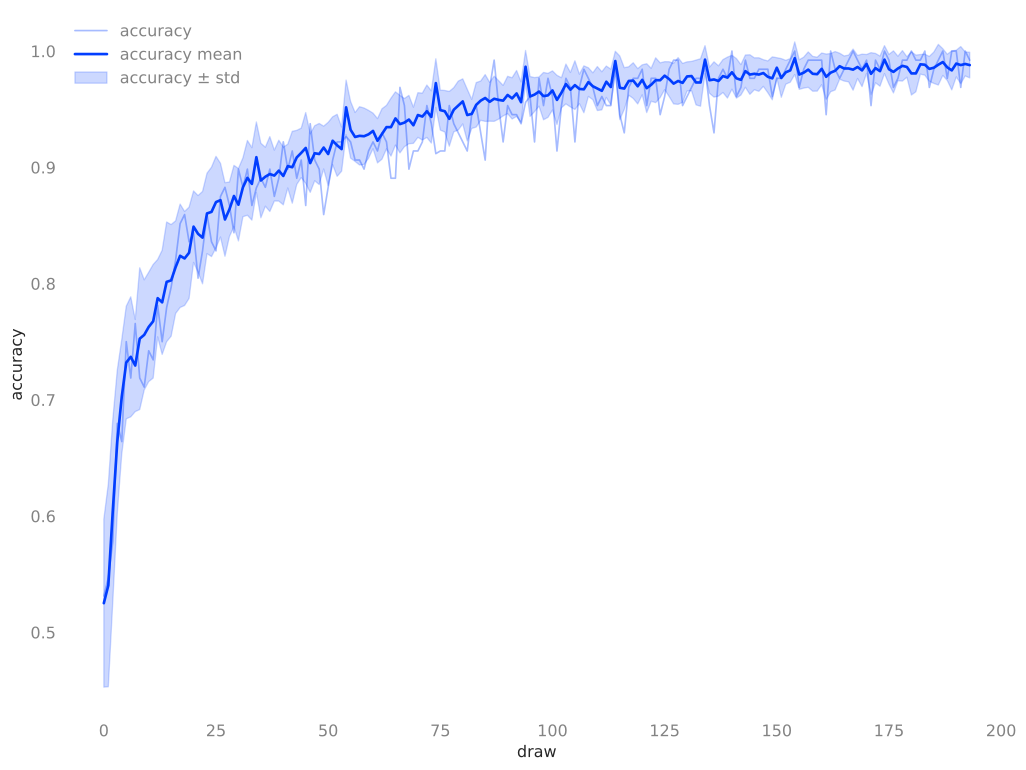
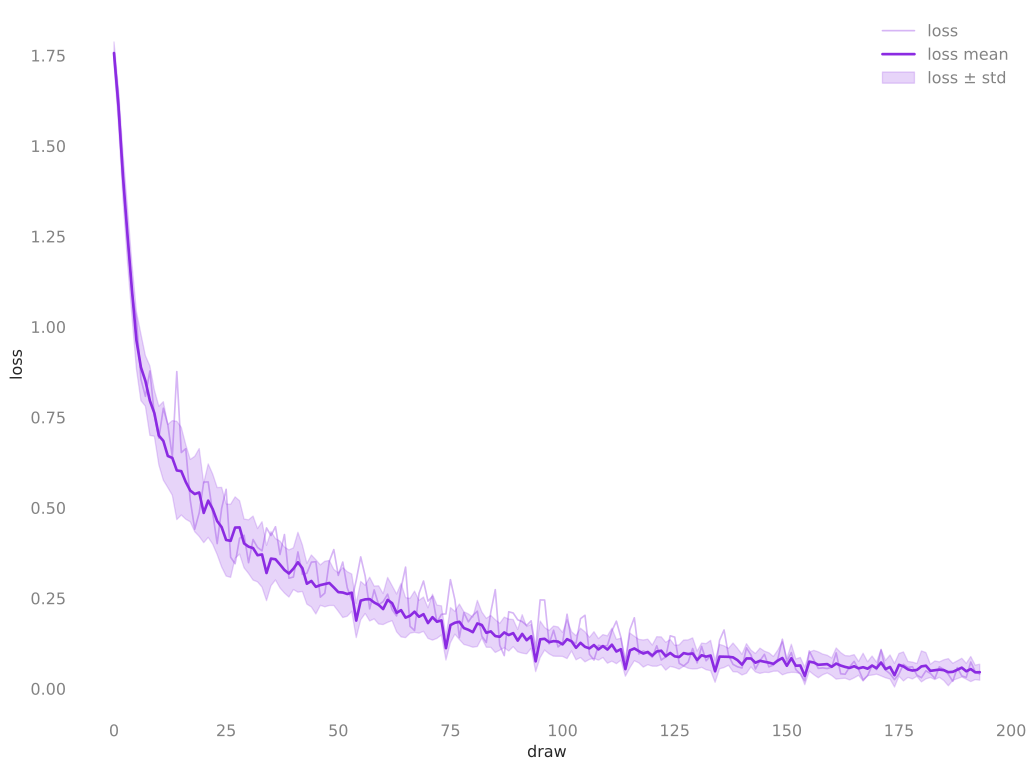
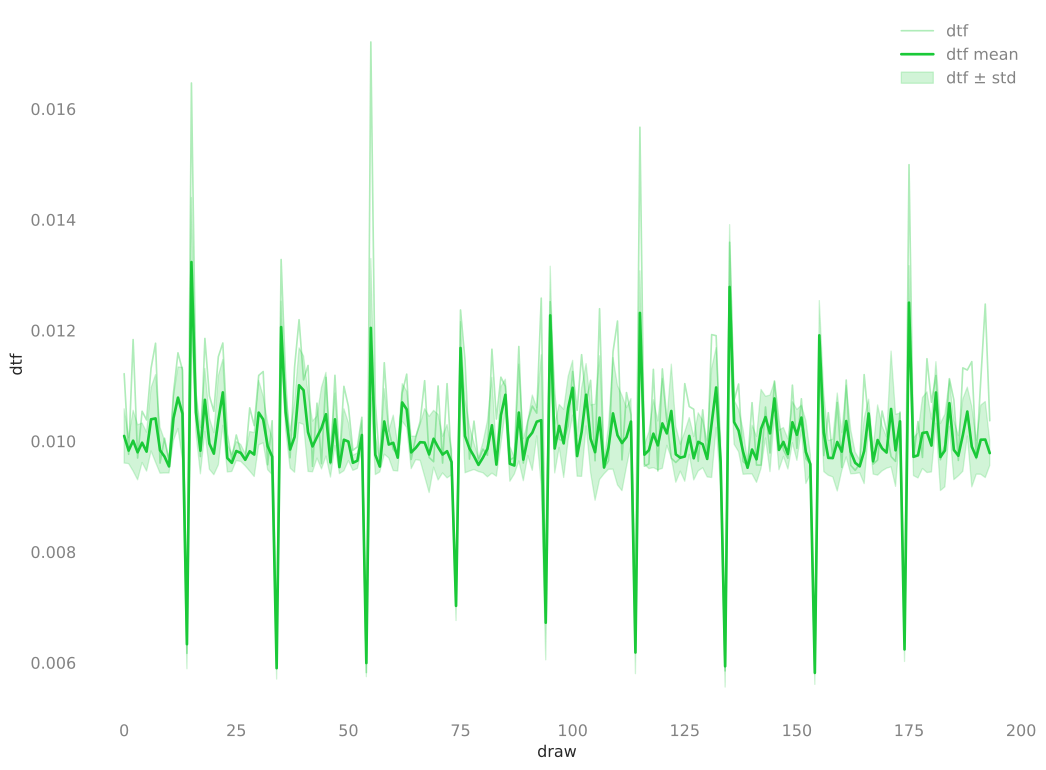
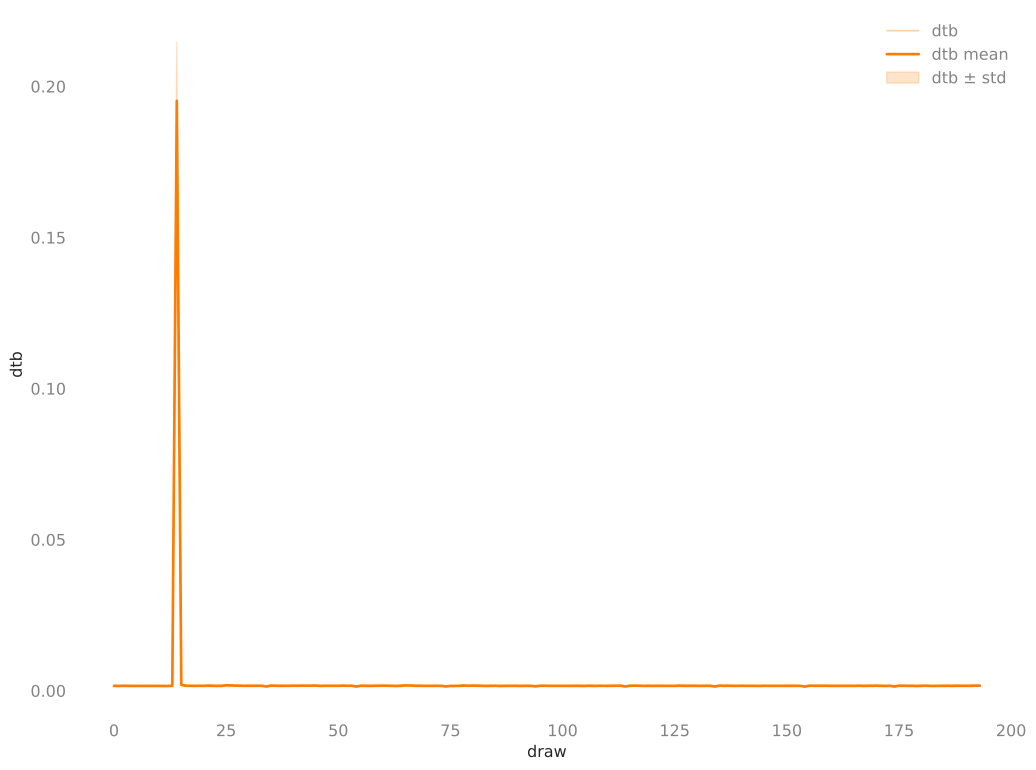
-
Terminal-based ASCII plots via
plotext┌─────────────────────────────────────────────────────────────────────────────────────────────────────────────────┐
0.992┤ ++ accuracy/max ▟ ▗ │
│ -- accuracy/min ▖ ▗ +█ +▖ █ ++▖+ │
│ ·· accuracy/mean + ▗▌ ▐▌·█ ▗▌ ▗▜ ·+ ▐▌ + █ ·▐▌▟ │
│ ▞▞ accuracy ++ + ▟▐▌ ▞▙▙▜ ▗▌ ▐▚ ▐▐ ·▟+▟▐▙▌▗▌▗ ▗▌▌▗▗▜▐▌█ +▞│
│ + +++· ▗ ▗+· +▗▜▐▌+▌█▜▐ ▐▌+ ▐▐▗ ▐▐+▖▐▐+▛▟█▌▌▌▛▄+█▌▌█▐ ▜▌█+▗▌│
│ ▗▌+ ▗▌+·· ▌▌ ▟ ▗▌█▗▌ ▟ ▗▌·▞▐▌▙▚▌█·▐·+ ▞▌·+ ▞·▜▟▌▐▐▐▞▐▟▌███·▌▌▝▖▌▘▌█▐ ·▌█·█▌│
0.928┤ ▗▌ ▐▌+ ▐▌··▄▌ +▌▌+ █ ▗▐▌█▐▌▟▐▐+▗▌▙▚▌▐▌▜·▘▝·▐▞▄▌▌▌▟·▗▘-▐█▌▝▞▝▌▐▌▘▝██·▝▌ ▐▌-▐█▞ ▚▜▗▀▌│
│ ▟ ▐▌▗▌ ▗▌▞▌· ▞▐·▐▝▌++▌▌+▞▜▗▜·▛▟▌█▞▌█▌▐·▌·█ ▐▌-· --▐▌·▚▌▙▘▙█·-·▜▌ - ▘ -██--- ▐▌ ▐█▌ ▐▐· │
│ ▗▌ █ ▞▌▐▚▗█▜·▌·▗▘▝▖▐·▌+·▌▌▗▘·▘ ▙▘▜▚█▌▙▀▌▝▞▘-█ ▘ - --▝▌ ▝▌▝ ▝█---·▘ -▝█ - ▐▌ ▝▌▘ ▐▞ │
│ + ▗+ ▌▌+█+▌▌▟▐▐█-·▚·▐··▚▐·▌·▟·▌▌-·- ▜-·-▝▌▜ -----█ - - - ▜- -- █ ▐▌ - ▐▌ │
│ + ▗▌ █· ▌▐▐▐▐·██·█▝ -▐▟▌-·▐▐-▌▞▝·█--- █ █ -▘ ▘ │
│ + ▐▌ ▗ ▛▖·▌▝▟▐▐·█▜·▝- ▐▌▘--▐▐ ▝▘-·▝- - █ █ │
0.865┤ + ▐▌ █ ▌▌▄▌·█▐▌·█--- ▝▌ - █ -- ▜ ▜ │
│ + ▐▌+█ ▌▝-·-▝ ▘·█--- - █ - │
│ ▖+▖ ▟▌+▛▖▌- -- ··▝- - ▜ │
│ ▐▌▐▌ ▐▝▌▗▘▙▘ - -·- │
│ +▐▌▐▙▌▐·▙▘-█· - -- │
0.801┤ ++▐▌▐█▚▐·█· █· -- │
│ ++▐▌▐█·▀·█· █· -- │
│▌ ++▐▚▐█· -█· ▜- - │
│▌ ++▐▐▐█· -█· │
│▌ +·▐▐▐█- -█· │
│▌ ··▐▐▌▜- -█- │
0.737┤▌▟··▐▐▌ -█- │
│▌█·▞▟▝▌ -▜- │
│▌▛▖▌█- -- │
│▌▌▌▌█- -- │
│▌▌▚▘█- - │
│▌▌--▜- │
0.673┤▙▘-- │
│█· - │
│█· │
│▝ │
│- │
│- │
0.609┤- │
└┬───────────────────────────┬───────────────────────────┬───────────────────────────┬───────────────────────────┬┘
1.0 49.2 97.5 145.8 194.0accuracy accuracy/min
┌─────────────────────────────────────────────────────┐ ┌─────────────────────────────────────────────────────┐
0.992┤ ▗▗ ▟ ▖ ▖ ▗ │0.977┤ -- - - - │
│ ▟▟▟█ ▗▌ ▟ █ ▌▟█▌▖▐▙▞█▌▞│0.915┤ - -- --- ---------------------------------│
0.935┤ ▖ ▟ ▟ ▖▗▌ ▐ ▌█▗▌▗▙█▜▛█▗▟▙ ▛█▜████▜▀▛█▌▜▙▌│0.854┤ --------------- - -- -- - - - - - - │
│ ▗▖▌▌▌▟█ ▛▟▌▐▙▛▛▟▙██▚▞▛▜▝ ▝▛▜▛▟ ▜▝▝▝ █▝ ▌▜▌▝█▘│0.793┤ ----------- -- │
0.878┤ ▖ ▟▐▙██▙█▐▟ █▚█▜ ▘ ▝▘ ▌ ▝ ▐ ▌ ▜ │ │ ---- - - │
│ ▌▟█▀▜▜█▘ ▘ █ ▘ ▝ │0.732┤ --- - │
0.820┤ ▟▟▟▙█▌ ▝ ▝ │0.671┤--- │
│ ████▐▌ │0.609┤- │
│▌ ██ █▝▌ │ └┬────────────┬────────────┬────────────┬────────────┬┘
0.763┤▌ █▜ █ │ 1.0 49.2 97.5 145.8 194.0
│▙██ ▜ │accuracy/min iter
0.706┤██▌ │ accuracy/std
│█ ▘ │ ┌─────────────────────────────────────────────────────┐
0.648┤▜ │0.094┤* * │
└┬────────────┬────────────┬────────────┬────────────┬┘0.078┤* * │
1.0 49.2 97.5 145.8 194.0 0.062┤* * * │
accuracy iter 0.047┤** * * * │
accuracy/mean │**** * * * * * * │
┌─────────────────────────────────────────────────────┐0.031┤**** ** **** ******* * * * * * * ** **** * │
0.977┤ ·· · · · │0.016┤*****************************************************│
│ · · ··· · ··· ·· ······│0.000┤* * *********** ******** *** **** ****** **** ****│
0.923┤ · ··· · · ··· ························│ └┬────────────┬────────────┬────────────┬────────────┬┘
│ ·· ················· · ·· ··· · ··· ··│ 1.0 49.2 97.5 145.8 194.0
│ · ··········· · · · · · │accuracy/std iter
0.868┤ ······· · · │ accuracy/max
│ ·· ··· · │ ┌─────────────────────────────────────────────────────┐
0.814┤ ······ │0.992┤ + +++ + + ++ + + +++ │
│ ···· · │0.936┤ + +++++++ +++++++++++++++++++++++++++++++│
0.760┤ ····· │0.880┤ + + ++++++++++++++++++++ + + + + + + │
│ ·· │0.824┤ ++ ++++ + + │
│ ·· │ │++++++ + │
0.706┤··· │0.768┤+++ │
│·· │0.712┤++ │
0.652┤· │0.656┤++ │
└┬────────────┬────────────┬────────────┬────────────┬┘ └┬────────────┬────────────┬────────────┬────────────┬┘
1.0 49.2 97.5 145.8 194.0 1.0 49.2 97.5 145.8 194.0
accuracy/mean iter accuracy/max iter┌──────────────────────────────────────────────────────────────────────────────────────────────────────────────────┐
1.78┤ ++ loss/max │
│ -- loss/min │
│ ·· loss/mean │
│ ▞▞ loss │
│▌+ │
│▚· │
1.50┤▐· │
│▐· │
│▐· │
│ ▌ │
│ ▌ │
│ ▌ │
1.21┤ ▚ │
│ ▐+ │
│ ▐▟ │
│ ▝█ │
│ ▐ │
0.93┤ ▝▖+ │
│ -▙▌ │
│ -▝▚+ │
│ -▐+▖ ▗▌ │
│ ▐▐▚ ▐▌ │
│ ▐▐▐ ▐▌ │
0.65┤ █▐ ▄▖+▐▌+ │
│ █▐▞·▐·▐▐+ + + │
│ █▐▌ ·▌▌▝▖▞▄ +· + ▟ │
│ ▝▝▌ ▚▌-█·▐ +▖ ·· ++ █ │
│ - ▐▌-█ ▐▗▐▌+▟ ▗▌+·+ █ ▗ + │
│ - ▐▌ ▜-▐▌█▐+█ ▐▌··▗▌+ ▖▖ +█ +▖ █ ▖ ++ ▗▌ │
0.37┤ ▘ -▘▝▝▖█+▐▌▞▖▐▚· ·▐▜▐·+·█ +▗▀▌ ▄ █ ▐▌ +▗▗ ▗▌ ++▗▌ ▟ ▗ ▗ ▐▌ │
│ - ▙▜·▞▚▌▝█▝▄▙▌▐-▝▄·▗▜ ▗█·▌▐▝▖·█ ▞▚+·██ ▐▌ ▗▖·▐▌▟ + ▗▌ █ ▟ █· + + + ▗ █ ▗▌ ▐▌ │
│ ▝ ▀ ▘ ▝ ▜▌▌--▝▄▘▐+▐▜-▐▐ ▚▄▛▖▌·▀█▐▛▖▞▌+▌▌▟▐▌█ ++ ·+· ▞▌ █ ++▗▗▜ ▌▌▖▟+·++▗▌+▗█ + █ ▟▐▌ ▐▌ │
│ ▚▌ ▜--▚▐ █ ▘▝▘- ▝▐▌█-▝▖▌▝▀▟▝▘▌▟· ····▌▌▗█▗▚▞▀▞▐·▌▜▌▌▚▗·▟▐▙▌██+▗▌·▌▌ ▛▟▐ +▗▟▌·▖│
│ -▘ ▜ ▐▌▝ ▝▘ █ -▚▘▙▀▀▙▌▟▌▝▘▘▜·▘--▝▞▌ ▚▌-▀▄▌▜██ ▜▗▘▌▟▌▌▖▌█▐+·▌█▌▐▌│
│ ▘ ▝ ▝--▝▝▝▌ - ▐▌ ▝▌ ▝▝ ▜-▚▘▘▝█·▝▝▄▖▌█▝▘▝│
0.08┤ ▝▌ ▜ ▝▌▝ │
└┬───────────────────────────┬────────────────────────────┬───────────────────────────┬───────────────────────────┬┘
1.0 49.2 97.5 145.8 194.0loss loss/min
┌──────────────────────────────────────────────────────┐ ┌──────────────────────────────────────────────────────┐
1.66┤▌ │1.66┤- │
│▐ │1.39┤-- │
1.39┤▐ │1.13┤ - │
│▐ │0.87┤ - │
1.13┤▐▖ │ │ -- - │
│▝▌ │0.61┤ -------- - │
0.87┤ ▐▖ │0.35┤ - - ------------------------------------ ------- --│
│ ▝▌▖ ▐ │0.08┤ - - --- -- ----------------------│
│ █▌▖▐ │ └┬────────────┬─────────────┬────────────┬────────────┬┘
0.61┤ ▜█▝▟▙▖ ▐ │ 1.0 49.2 97.5 145.8 194.0
│ ▝ █▜▙█▐▗▌ ▖ ▄ ▐ ▗ ▗▗ ▗ │loss/min iter
0.35┤ ▝ ▝▝▛▟█▟▚█▘▙▟▗▛▄▌█▞▄▙▙▌▄▟▗ ▗▖▌ ▄▌▗ ▖▗ ▗▌▗▌ █ │ loss/std
│ ▜ ▐ ▜▘▜▝▀▘▝█▛▜▝█▀▟▄▄▟▙▙▛▀██▛▙███▐▐▙█▌▐█▖│ ┌─────────────────────────────────────────────────────┐
0.08┤ ▝ ▝ ▘▝▀ ▝▝▌ ▀▀▝▘▀▀▛▝▜▛▝│0.216┤ │
└┬────────────┬─────────────┬────────────┬────────────┬┘0.180┤ │
1.0 49.2 97.5 145.8 194.0 0.144┤ │
loss iter 0.108┤ │
loss/mean │ * ** │
┌──────────────────────────────────────────────────────┐0.072┤**** * ** ******* ********** ** │
1.72┤· │0.036┤***** ********************************************** │
│· │0.000┤ * * ******* **** ** │
1.45┤· │ └┬────────────┬────────────┬────────────┬────────────┬┘
│ · │ 1.0 49.2 97.5 145.8 194.0
│ · │loss/std iter
1.18┤ · │ loss/max
│ · │ ┌──────────────────────────────────────────────────────┐
0.92┤ ·· │1.78┤+ │
│ · │1.50┤+ │
0.65┤ ···· │1.23┤ + │
│ ····· · │0.95┤ ++ │
│ ······· · │ │ +++ + │
0.39┤ · ················ ···· · · · · · · │0.67┤ +++++++++++ + │
│ ····· ··································│0.40┤ +++++++++++++++++++++++++++++++++++++++++++++++│
0.12┤ ··· ···· · ·······│0.12┤ + ++ + +++++++++++++ +++++++++│
└┬────────────┬─────────────┬────────────┬────────────┬┘ └┬────────────┬─────────────┬────────────┬────────────┬┘
1.0 49.2 97.5 145.8 194.0 1.0 49.2 97.5 145.8 194.0
loss/mean iter loss/max iter
-
- Automatic Markdown Report Generation!
-
Automatic single-process logging with rank-aware filtering for distributed runs:
⚙️ Environment Variables⚓︎
Additional configuration can be done through environment variables, including:
-
The colorized logging output can be toggled via the
NO_COLORenvironment var, e.g. to turn off colors: -
Force logging from all ranks (not just rank 0):
-
Forcing a specific torch device (useful on GPU hosts when you want CPU-only):
-
Text Based Plots:
-
Changing the plot marker used in the text-based plots:
-
Changing the plot size:
The plots will automatically scale (up to a reasonable limit) with the dimensions of the terminal in which they're run.
If desired, these can be specified explicitly by overriding the
LINESandCOLUMNSenvironment variables, e.g.:
-
Complete List
| Environment Variable | Purpose / how it’s used |
|---|---|
| TORCH_DEVICE | Force device selection (cpu, cuda, mps, xpu) when picking the torch device. |
| TORCH_BACKEND | Override distributed backend (nccl, gloo, mpi, xla). |
| TORCH_DDP_TIMEOUT | Adjust DDP init timeout (seconds) for slow launches. |
| MASTER_ADDR | Manually set rendezvous address if auto-detection is wrong/unreachable. |
| MASTER_PORT | Manually set rendezvous port for distributed init. |
| HOSTFILE | Point ezpz at a specific hostfile when scheduler defaults are missing/incorrect. |
| NO_COLOR / NOCOLOR / COLOR / COLORTERM | Enable/disable colored output to suit terminals or log sinks. |
| EZPZ_LOG_LEVEL | Set ezpz logging verbosity. |
| LOG_LEVEL | General log level for various modules. |
| LOG_FROM_ALL_RANKS | Allow logs from all ranks (not just rank 0). |
| PYTHONHASHSEED | Fix Python hash seed for reproducibility. |
| WANDB_DISABLED | Disable Weights & Biases logging. |
| WANDB_MODE | Set W&B mode (online, offline, dryrun). |
| WANDB_PROJECT / WB_PROJECT / WB_PROJECT_NAME | Set project name for W&B runs. |
| WANDB_API_KEY | Supply W&B API key for authentication. |
| EZPZ_LOCAL_HISTORY | Control local history storage/enablement. |
| EZPZ_NO_DISTRIBUTED_HISTORY | Disable distributed history aggregation. |
| EZPZ_TPLOT_TYPE | Select timeline plot type. |
| EZPZ_TPLOT_MARKER | Marker style for timeline plots. |
| EZPZ_TPLOT_MAX_HEIGHT | Max height for timeline plots. |
| EZPZ_TPLOT_MAX_WIDTH | Max width for timeline plots. |
| EZPZ_TPLOT_RAW_MARKER | Marker for raw timeline data. |
| CPU_BIND | Override default CPU binding for PBS launch commands (advanced). |
ℹ️ More Information⚓︎
- Examples live under
ezpz.examples.*—copy them or extend them for your workloads. - Stuck? Check the docs, or run
ezpz doctorfor actionable hints. - See my (~ recent) talk on:
LLMs on Aurora: Hands On with
ezpzfor a detailed walk-through containing examples and use cases. - Reach out!
-
With first class support for all of the major HPC Supercomputing centers (e.g. ALCF, OLCF, NERSC) ↩
-
This is particularly useful if you'd like to run development / debugging experiments locally ↩
-
The
ezpz.Historyclass automatically computes distributed statistics (min, max, mean, std) across ranks for all recorded metrics.
NOTE: This is automatically disabled whenezpz.get_world_size() >= 384(e.g. >= {32, 96} {Aurora, Polaris} nodes) due to the additional overhead introduced (but can be manually enabled, if desired). ↩ -
If you don't have
uvinstalled, you can install it via:See the uv documentation for more details. ↩
-
The https://bit.ly/ezpz-utils URL is just a short link for convenience that actually points to https://raw.githubusercontent.com/saforem2/ezpz/main/src/ezpz/bin/utils.sh ↩